


Page 76 - LIT-18626-13-39
P. 76
UF3V13E0.book Page 67 Thursday, September 30, 2021 2:21 PM
Instrument operation
Display a list of registered tracks (3) Select “Save”.
Display detailed information for a regis-
tered track 1
Activate or stop the “Record” function
Edit Track Save
Edit or delete track information
Activate or stop the “Follow” function
Switch between displaying and not dis-
playing a track A B B
TIP
For how to activate and stop the “Record”
function and “Follow” function, see page 54.
1 “Save”
Display the track manager to display a list of
TIP
registered tracks.
When the track display color changes,
Select a registered list to display the detailed
“Save” is displayed.
information for those tracks.
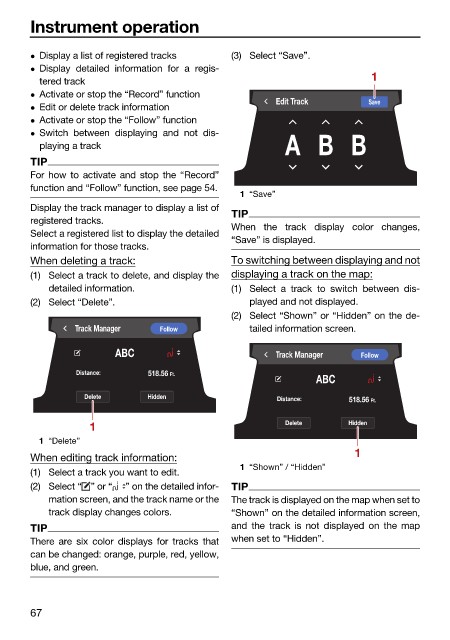
When deleting a track: To switching between displaying and not
(1) Select a track to delete, and display the displaying a track on the map:
detailed information. (1) Select a track to switch between dis-
(2) Select “Delete”. played and not displayed.
(2) Select “Shown” or “Hidden” on the de-
Track Manager Follow tailed information screen.
ABC Track Manager Follow
Distance: 518.56 Ft.
ABC
Delete Hidden Distance: 518.56 Ft.
1 Delete Hidden
1 “Delete”
1
When editing track information:
1 “Shown” / “Hidden”
(1) Select a track you want to edit.
(2) Select “ ” or “ ” on the detailed infor- TIP
mation screen, and the track name or the The track is displayed on the map when set to
track display changes colors. “Shown” on the detailed information screen,
TIP and the track is not displayed on the map
There are six color displays for tracks that when set to “Hidden”.
can be changed: orange, purple, red, yellow,
blue, and green.
67

