


Page 39 - LIT-18626-13-43
P. 39
UF4N11E0.book  Page 31  Wednesday, July 21, 2021  2:21 PM


                                                         Control function operation

                        EJU31027
                          Watercraft control functions        TIP
                                                              The multifunction information center is turned
                        EJU45091
                        Yamaha Security System                on, even if the engine start/stop switch is also
                        (VX DELUXE / VX CRUISER / VX          pushed briefly.
                        LIMITED)
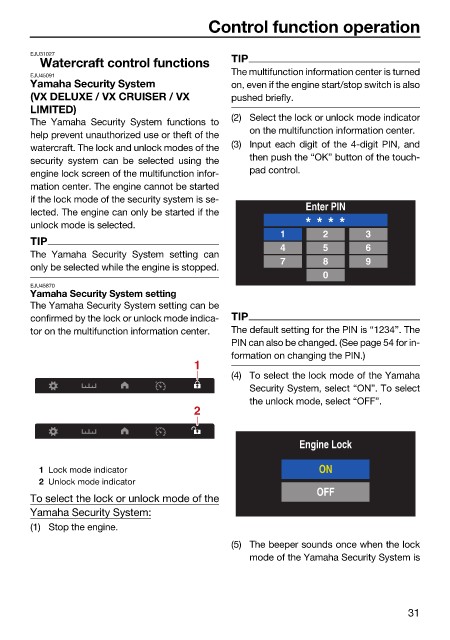
                                                              (2) Select the lock or unlock mode indicator
                        The  Yamaha  Security System functions to
                                                                 on the multifunction information center.
                        help prevent unauthorized use or theft of the
                        watercraft. The lock and unlock modes of the  (3) Input each digit of the 4-digit PIN, and
                        security system can  be selected  using  the  then push the “OK” button of the touch-
                        engine lock screen of the multifunction infor-  pad control.
                        mation center. The engine cannot be started
                        if the lock mode of the security system is se-
                        lected. The engine can only be started if the       Enter PIN
                        unlock mode is selected.                           * * * *
                                                                       1       2       3
                        TIP
                                                                       4       5       6
                        The  Yamaha Security  System setting  can
                                                                       7       8       9
                        only be selected while the engine is stopped.
                                                                               0
                        EJU45870
                        Yamaha Security System setting
                        The Yamaha Security System setting can be
                        confirmed by the lock or unlock mode indica-  TIP
                        tor on the multifunction information center.  The default setting for the PIN is “1234”. The
                                                              PIN can also be changed. (See page 54 for in-
                                                              formation on changing the PIN.)
                                                       1
                                                              (4) To select the lock mode of the Yamaha
                                                                 Security System, select “ON”. To select
                                                                 the unlock mode, select “OFF”.
                                                       2


                                                                          Engine Lock

                          1 Lock mode indicator                               ON
                          2 Unlock mode indicator
                                                                              OFF
                        To select the lock or unlock mode of the
                        Yamaha Security System:
                        (1) Stop the engine.
                                                              (5) The beeper sounds once when the lock
                                                                 mode of the Yamaha Security System is


                                                                                               31

