


Page 66 - LIT-18626-13-43
P. 66
UF4N11E0.book  Page 58  Wednesday, July 21, 2021  2:21 PM


                        Instrument operation

                        EJU46301                              Cursor button “ / ”
                            Audio system (equipped            Press these buttons to skip to the previous or
                                     models)                  next track.
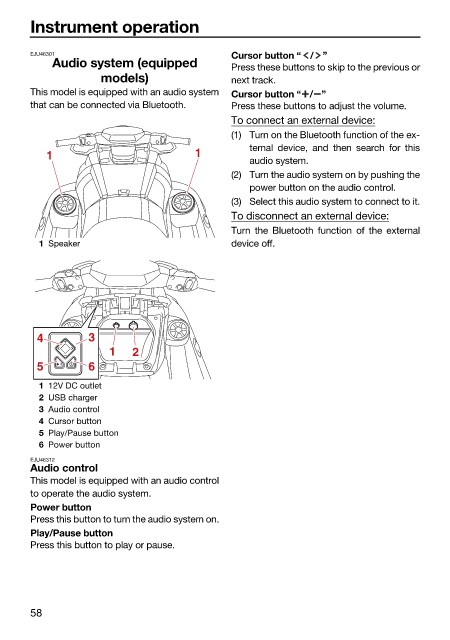
                        This model is equipped with an audio system  Cursor button “ / ”
                        that can be connected via Bluetooth.  Press these buttons to adjust the volume.
                                                              To connect an external device:
                                                              (1) Turn on the Bluetooth function of the ex-
                                                                 ternal device, and  then search for this
                           1                           1
                                                                 audio system.
                                                              (2) Turn the audio system on by pushing the
                                                                 power button on the audio control.
                                                              (3) Select this audio system to connect to it.
                                                              To disconnect an external device:
                                                              Turn the Bluetooth function of the  external
                          1 Speaker                           device off.


                         4         3
                                       1   2
                         5         6
                          1 12V DC outlet
                          2 USB charger
                          3 Audio control
                          4 Cursor button
                          5 Play/Pause button
                          6 Power button
                        EJU46312
                        Audio control
                        This model is equipped with an audio control
                        to operate the audio system.
                        Power button
                        Press this button to turn the audio system on.
                        Play/Pause button
                        Press this button to play or pause.


                        58

