


Page 52 - LIT-18626-13-93
P. 52
UF3V14E0.book  Page 43  Wednesday, July 20, 2022  9:04 AM


                        Watercraft operation

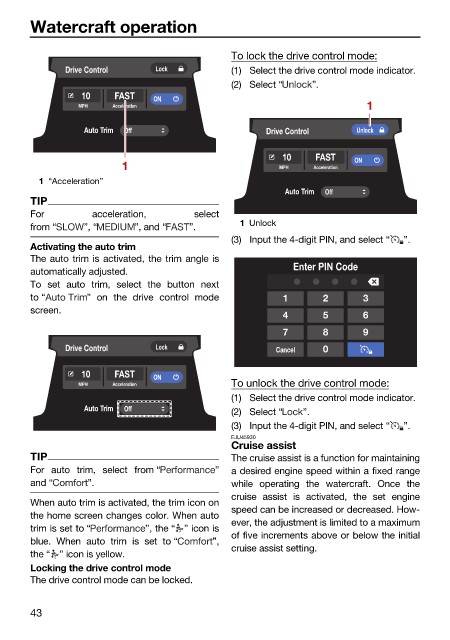
                                                              To lock the drive control mode:
                               Drive Control    Lock          (1) Select the drive control mode indicator.
                                                              (2) Select “   ”.
                                  10    FAST   ON
                                 MPH    Acceleration                                   1
                                  Auto Trim  Off                    Drive Control    Unlock

                                                                       10    FAST    ON
                                         1                             MPH   Acceleration
                          1 “Acceleration”
                                                                        Auto Trim  Off
                        TIP
                        For         acceleration,      select
                                                               1 Unlock
                        from “    ”, “      ”, and “  ”.
                                                              (3) Input the 4-digit PIN, and select “  ”.
                        Activating the auto trim
                        The auto trim is activated, the trim angle is
                        automatically adjusted.                          Enter PIN Code
                        To  set auto  trim, select the  button next
                        to “       ” on  the drive  control mode       1       2      3
                        screen.
                                                                       4       5      6
                                                                       7       8      9
                               Drive Control    Lock                  Cancel   0
                                  10    FAST   ON
                                 MPH    Acceleration          To unlock the drive control mode:
                                                              (1) Select the drive control mode indicator.
                                  Auto Trim  Off              (2) Select “  ”.
                                                              (3) Input the 4-digit PIN, and select “  ”.
                                                              EJU45930
                                                              Cruise assist
                        TIP                                   The cruise assist is a function for maintaining
                        For auto trim,  select from “      ”  a desired engine speed within a fixed range
                        and “      ”.                         while operating the watercraft. Once the
                                                              cruise assist is  activated, the  set  engine
                        When auto trim is activated, the trim icon on
                                                              speed can be increased or decreased. How-
                        the home screen changes color. When auto
                                                              ever, the adjustment is limited to a maximum
                        trim is set to “      ”, the “ ” icon is
                                                              of five increments above or below the initial
                        blue. When  auto  trim is set to “  ”,
                                                              cruise assist setting.
                        the “ ” icon is yellow.
                        Locking the drive control mode
                        The drive control mode can be locked.
                        43

