Page 60 - LIT-18626-13-93
P. 60

UF3V14E0.book  Page 51  Wednesday, July 20, 2022  9:04 AM


                        Instrument operation

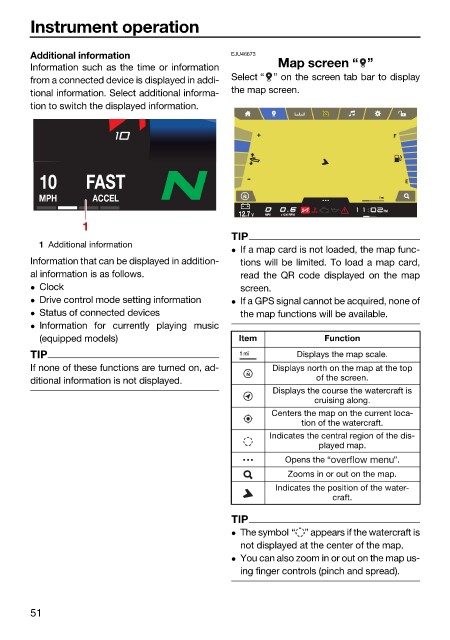
                        Additional information                EJU46673
                        Information such as the time or information   Map screen “ ”
                        from a connected device is displayed in addi-  Select “ ” on the screen tab bar to display
                        tional information. Select additional informa-  the map screen.
                        tion to switch the displayed information.


                          10       FAST
                          MPH       ACCEL                                                1 mi
                                                                                          PM
                                                                    MPH
                                                               12.7 V  MPH  x1000 RPM
                                  1
                                                              TIP
                          1 Additional information
                                                               If a map card is not loaded, the map func-
                        Information that can be displayed in addition-  tions will be limited. To load a map card,
                        al information is as follows.          read the QR code displayed on the map
                         Clock                                screen.
                         Drive control mode setting information   If a GPS signal cannot be acquired, none of
                         Status of connected devices          the map functions will be available.
                         Information for  currently playing music
                          (equipped models)                    Item            Function
                        TIP                                    1 mi       Displays the map scale.
                        If none of these functions are turned on, ad-  Displays north on the map at the top
                        ditional information is not displayed.               of the screen.
                                                                     Displays the course the watercraft is
                                                                             cruising along.
                                                                     Centers the map on the current loca-
                                                                           tion of the watercraft.
                                                                     Indicates the central region of the dis-
                                                                              played map.
                                                                        Opens the “         ”.
                                                                        Zooms in or out on the map.
                                                                      Indicates the position of the water-
                                                                                 craft.
                                                              TIP
                                                               The symbol “ ” appears if the watercraft is
                                                               not displayed at the center of the map.
                                                               You can also zoom in or out on the map us-
                                                               ing finger controls (pinch and spread).


                        51
   55   56   57   58   59   60   61   62   63   64   65