


Page 69 - LIT-18626-13-93
P. 69
UF3V14E0.book Page 60 Wednesday, July 20, 2022 9:04 AM
Instrument operation
EJU46731 EJU46741
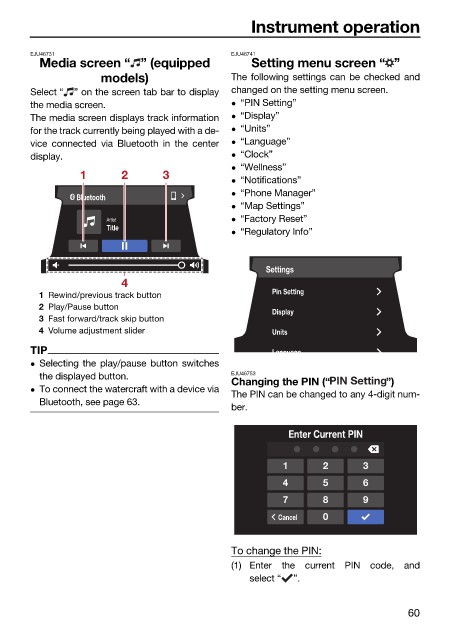
Media screen “ ” (equipped Setting menu screen “ ”
models) The following settings can be checked and
Select “ ” on the screen tab bar to display changed on the setting menu screen.
the media screen. “PIN Setting”
The media screen displays track information “Display”
for the track currently being played with a de- “Units”
vice connected via Bluetooth in the center “Language”
display. “Clock”
“Wellness”
1 2 3
“Notifications”
“Phone Manager”
Bluetooth
“Map Settings”
“Factory Reset”
Artist
Title
“Regulatory Info”
Settings
4
Pin Setting
1 Rewind/previous track button
2 Play/Pause button
Display
3 Fast forward/track skip button
4 Volume adjustment slider Units
TIP Language
Selecting the play/pause button switches
the displayed button. EJU46753
Changing the PIN (“ ”)
To connect the watercraft with a device via
The PIN can be changed to any 4-digit num-
Bluetooth, see page 63.
ber.
Enter Current PIN
1 2 3
4 5 6
7 8 9
Cancel 0
To change the PIN:
(1) Enter the current PIN code, and
select “ ”.
60

