Page 82 - LIT-18626-13-93
P. 82

UF3V14E0.book  Page 73  Wednesday, July 20, 2022  9:04 AM


                        Instrument operation

                        Play/Pause button                     TIP
                        Press this button to play or pause.
                                                              Voice commands may not be available de-
                        Cursor button “ / ”                   pending on the device connected to the wa-
                        Press these buttons to skip to the previous or
                                                              tercraft.
                        next track.
                        Cursor button “ / ”
                        Press these buttons to adjust the volume.
                        TIP
                         Playing music may stop to save power to
                          start the engine.
                         See page 63 for how to connect watercraft
                          to your device via Bluetooth.
                        EJU46951
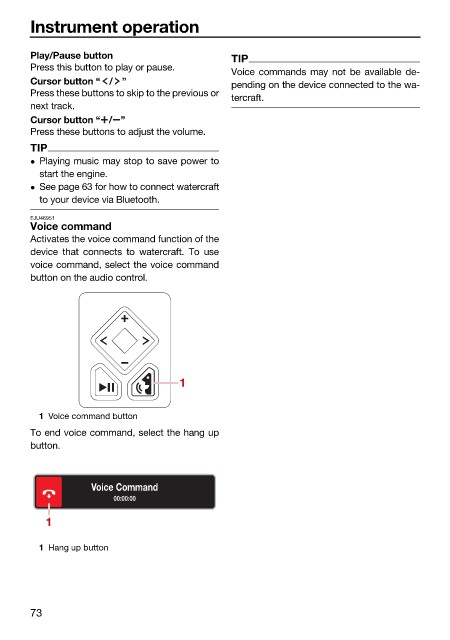
                        Voice command
                        Activates the voice command function of the
                        device that connects  to watercraft.  To  use
                        voice command, select the voice command
                        button on the audio control.


                                                    1


                          1 Voice command button
                        To end voice command, select the hang up
                        button.


                                    Voice Command
                                        00:00:00

                           1

                          1 Hang up button


                        73
   77   78   79   80   81   82   83   84   85   86   87