


Page 66 - LIT-18626-13-97
P. 66
UF4N12E0.book  Page 58  Thursday, July 14, 2022  10:42 AM


                        Instrument operation

                        EJU46302                              Cursor button “ / ”
                            Audio system (equipped            Press these buttons to skip to the previous or
                                     models)                  next track.
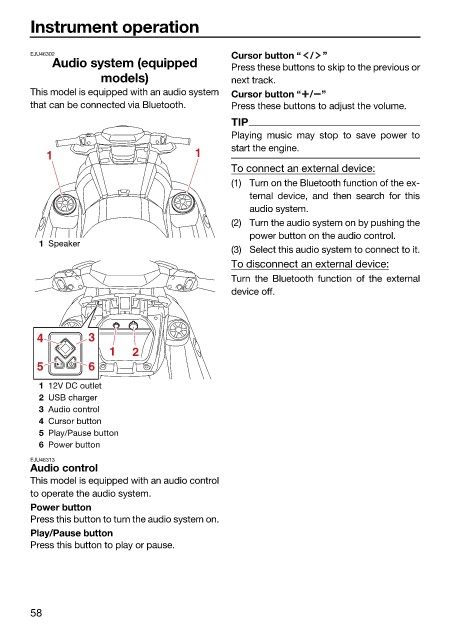
                        This model is equipped with an audio system  Cursor button “ / ”
                        that can be connected via Bluetooth.  Press these buttons to adjust the volume.
                                                              TIP
                                                              Playing  music may stop  to save power  to
                                                              start the engine.
                           1                           1
                                                              To connect an external device:
                                                              (1) Turn on the Bluetooth function of the ex-
                                                                 ternal device, and  then search for this
                                                                 audio system.
                                                              (2) Turn the audio system on by pushing the
                                                                 power button on the audio control.
                          1 Speaker
                                                              (3) Select this audio system to connect to it.
                                                              To disconnect an external device:
                                                              Turn the Bluetooth function of the  external
                                                              device off.


                         4         3
                                       1   2
                         5         6
                          1 12V DC outlet
                          2 USB charger
                          3 Audio control
                          4 Cursor button
                          5 Play/Pause button
                          6 Power button
                        EJU46313
                        Audio control
                        This model is equipped with an audio control
                        to operate the audio system.
                        Power button
                        Press this button to turn the audio system on.
                        Play/Pause button
                        Press this button to play or pause.


                        58

