


Page 52 - LIT-18626-14-59
P. 52
UF4P14E0.book  Page 45  Friday, June 30, 2023  1:43 PM


                        Instrument operation

                        EJU45943
                            Multifunction information
                                      center
                                                                                 1
                        The multifunction information center displays
                        various watercraft information.                          2           3
                        The multifunction information center can turn
                        the various functions on or off or change set-
                        tings by using the d-pad of the touchpad
                        control.
                        In  addition, the language and display units
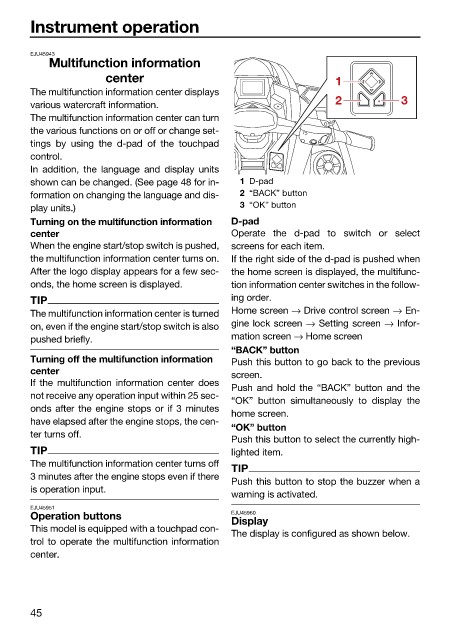
                        shown can be changed. (See page 48 for in-  1 D-pad
                        formation on changing the language and dis-  2 “BACK” button
                        play units.)                           3 “OK” button
                        Turning on the multifunction information   D-pad
                        center                                Operate the d-pad to switch or select
                        When the engine start/stop switch is pushed,  screens for each item.
                        the multifunction information center turns on.  If the right side of the d-pad is pushed when
                        After the logo display appears for a few sec-  the home screen is displayed, the multifunc-
                        onds, the home screen is displayed.   tion information center switches in the follow-
                        TIP                                   ing order.
                        The multifunction information center is turned  Home screen → Drive control screen → En-
                        on, even if the engine start/stop switch is also  gine lock screen → Setting screen → Infor-
                        pushed briefly.                       mation screen → Home screen
                                                              “BACK” button
                        Turning off the multifunction information   Push this button to go back to the previous
                        center
                                                              screen.
                        If the  multifunction information center  does
                                                              Push and  hold the “BACK” button and  the
                        not receive any operation input within 25 sec-
                                                              “OK” button simultaneously to display  the
                        onds after the engine stops or if 3 minutes
                                                              home screen.
                        have elapsed after the engine stops, the cen-
                                                              “OK” button
                        ter turns off.
                                                              Push this button to select the currently high-
                        TIP                                   lighted item.
                        The multifunction information center turns off
                                                              TIP
                        3 minutes after the engine stops even if there
                                                              Push this button to stop the buzzer when a
                        is operation input.
                                                              warning is activated.
                        EJU45951
                        Operation buttons                     EJU45960
                                                              Display
                        This model is equipped with a touchpad con-
                                                              The display is configured as shown below.
                        trol to operate the multifunction information
                        center.

                        45

