Page 80 - LIT-18626-15-21
P. 80

UF7K11E0.book  Page 68  Monday, June 17, 2024  7:03 PM


                        Instrument operation

                        Select a registered track in the list to display  To switching between displaying and not
                        detailed information.                 displaying a track on the map:
                        To delete a track:                    (1) Select a track  to switch  between dis-
                        (1) Select a track to delete, and display the  played and not displayed.
                            detailed information.             (2) Select “   ” or “    ”  on the  de-
                        (2) Select “   ”.                        tailed information screen.


                                  Track Manager  Follow                Track Manager  Follow
                                      DOCK TO...                           DOCK TO...

                                  Distance:   83.94 Ft.                Distance:   83.94 Ft.
                                   Delete    Shown                       Delete    Shown

                                    1                                               1
                          1 “Delete”                           1 “Shown” / “Hidden”
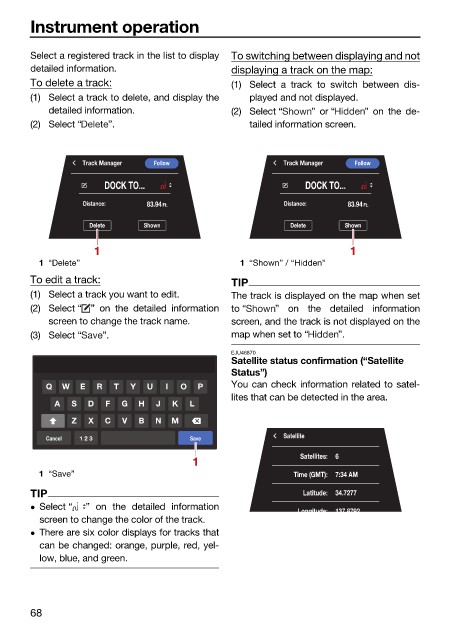
                        To edit a track:                      TIP
                        (1) Select a track you want to edit.  The track is displayed on the map when set
                        (2) Select “ ” on the detailed  information  to “  ” on  the detailed  information
                            screen to change the track name.  screen, and the track is not displayed on the
                        (3) Select “  ”.                      map when set to “   ”.
                                                              EJU46870
                                                              Satellite status confirmation (“Satellite
                                                              Status”)
                           Q  W   E  R  T  Y  U  I  O  P      You can check information related to satel-
                                                              lites that can be detected in the area.
                             A  S  D  F  G  H   J  K  L
                                Z  X  C  V  B   N  M
                           Cancel  1 2 3              Save             Satellite
                                                      1                   Satellites:  6
                          1 “Save”                                       Time (GMT):  7:34 AM
                        TIP                                                Latitude:  34.7277
                         Select “  ” on the detailed information         Longitude:  137 8792
                          screen to change the color of the track.
                         There are six color displays for tracks that
                          can be changed: orange, purple, red, yel-
                          low, blue, and green.


                        68
   75   76   77   78   79   80   81   82   83   84   85