


Page 72 - LIT-18626-15-25
P. 72
UF4N14E0.book  Page 61  Friday, May 24, 2024  8:56 AM


                        Instrument operation

                        EJU47530                              Media screen shortcut button
                            Audio system (equipped            Press this button to  display  to the media
                                     models)                  screen from any screen.
                        This model is equipped with an audio system  Play/Pause button
                        that can be connected via Bluetooth.  Press this button to play or pause.
                                                              Cursor button “ / ”
                                                              Press these buttons to skip to the previous or
                                                              next track.
                           1                           1      Cursor button “ / ”
                                                              Press these buttons to adjust the volume.
                                                              TIP
                                                              Playing  music may stop  to save power  to
                                                              start the engine.

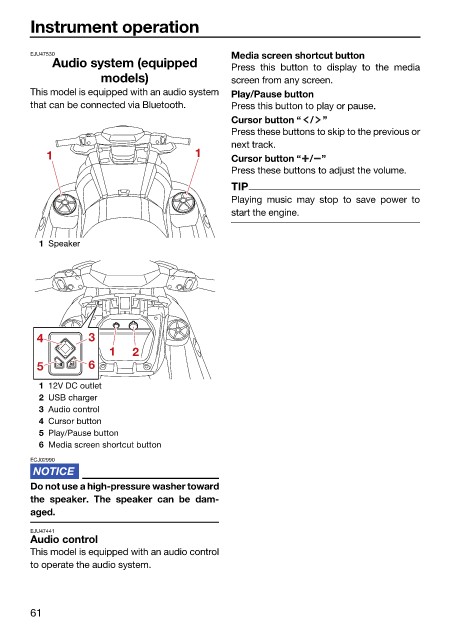
                          1 Speaker


                         4         3
                                       1   2
                         5         6
                          1 12V DC outlet
                          2 USB charger
                          3 Audio control
                          4 Cursor button
                          5 Play/Pause button
                          6 Media screen shortcut button
                        ECJ02990

                        Do not use a high-pressure washer toward
                        the speaker.  The  speaker can be  dam-
                        aged.

                        EJU47441
                        Audio control
                        This model is equipped with an audio control
                        to operate the audio system.


                        61

