


Page 52 - LIT-18626-13-38
P. 52
UF3X13E0.book  Page 43  Tuesday, September 28, 2021  12:57 PM


                        Watercraft operation

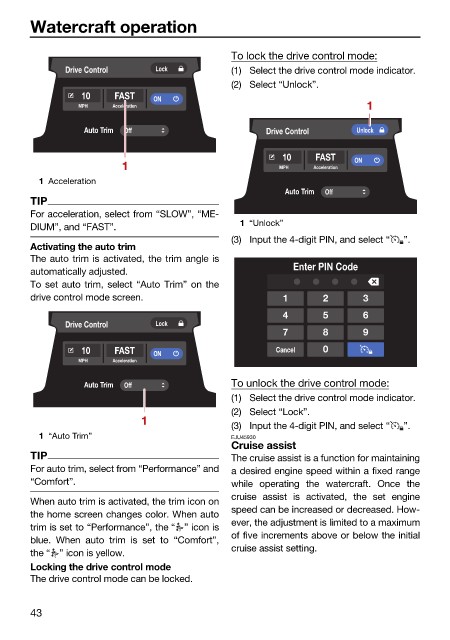
                                                              To lock the drive control mode:
                               Drive Control    Lock          (1) Select the drive control mode indicator.
                                                              (2) Select “Unlock”.
                                  10    FAST   ON
                                 MPH    Acceleration                                   1
                                  Auto Trim  Off                    Drive Control    Unlock

                                                                       10    FAST    ON
                                         1                             MPH   Acceleration
                          1 Acceleration
                                                                        Auto Trim  Off
                        TIP
                        For acceleration, select from “SLOW”, “ME-
                                                               1 “Unlock”
                        DIUM”, and “FAST”.
                                                              (3) Input the 4-digit PIN, and select “  ”.
                        Activating the auto trim
                        The auto trim is activated, the trim angle is
                        automatically adjusted.                          Enter PIN Code
                        To set auto trim, select “Auto Trim” on the
                        drive control mode screen.                     1       2      3
                                                                       4       5      6
                               Drive Control    Lock
                                                                       7       8      9
                                  10    FAST   ON                     Cancel   0
                                 MPH    Acceleration

                                  Auto Trim  Off              To unlock the drive control mode:
                                                              (1) Select the drive control mode indicator.
                                                              (2) Select “Lock”.
                                             1
                                                              (3) Input the 4-digit PIN, and select “  ”.
                          1 “Auto Trim”                       EJU45930
                                                              Cruise assist
                        TIP                                   The cruise assist is a function for maintaining
                        For auto trim, select from “Performance” and  a desired engine speed within a fixed range
                        “Comfort”.                            while operating the watercraft. Once the
                                                              cruise assist is  activated, the  set  engine
                        When auto trim is activated, the trim icon on
                                                              speed can be increased or decreased. How-
                        the home screen changes color. When auto
                                                              ever, the adjustment is limited to a maximum
                        trim is set to “Performance”, the “ ” icon is
                                                              of five increments above or below the initial
                        blue. When auto trim is set to “Comfort”,
                                                              cruise assist setting.
                        the “ ” icon is yellow.
                        Locking the drive control mode
                        The drive control mode can be locked.
                        43

