


Page 47 - LIT-18626-13-42
P. 47
UF4S11E0.book  Page 40  Thursday, July 29, 2021  9:31 AM


                                                                  Watercraft operation


                                                1                     1                2
                                                                          Drive Control
                                                                     Speed            Accel.
                                     Drive Control
                                                                     High
                                                                                      Nomal
                                  Speed/Acceleration                 Middle
                                                                                      Slow
                                                                     Low
                                        Lock                                  Save
                                                                               3
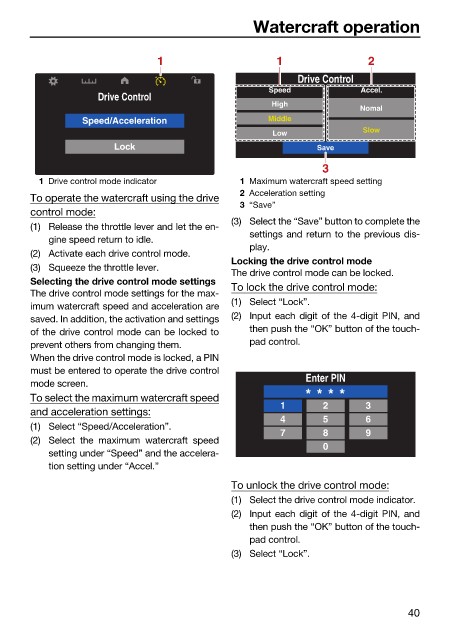
                          1 Drive control mode indicator       1 Maximum watercraft speed setting
                                                               2 Acceleration setting
                        To operate the watercraft using the drive
                                                               3 “Save”
                        control mode:
                                                              (3) Select the “Save” button to complete the
                        (1) Release the throttle lever and let the en-
                                                                 settings and return to the previous dis-
                            gine speed return to idle.
                                                                 play.
                        (2) Activate each drive control mode.
                                                              Locking the drive control mode
                        (3) Squeeze the throttle lever.
                                                              The drive control mode can be locked.
                        Selecting the drive control mode settings  To lock the drive control mode:
                        The drive control mode settings for the max-
                                                              (1) Select “Lock”.
                        imum watercraft speed and acceleration are
                        saved. In addition, the activation and settings  (2) Input each digit of the 4-digit PIN, and
                        of the drive control mode can be locked to  then push the “OK” button of the touch-
                        prevent others from changing them.       pad control.
                        When the drive control mode is locked, a PIN
                        must be entered to operate the drive control
                                                                            Enter PIN
                        mode screen.
                        To select the maximum watercraft speed             * * * *
                                                                       1       2       3
                        and acceleration settings:
                                                                       4       5       6
                        (1) Select “Speed/Acceleration”.
                                                                       7       8       9
                        (2) Select the maximum  watercraft  speed
                                                                               0
                            setting under “Speed” and the accelera-
                            tion setting under “Accel.”
                                                              To unlock the drive control mode:
                                                              (1) Select the drive control mode indicator.
                                                              (2) Input each digit of the 4-digit PIN, and
                                                                 then push the “OK” button of the touch-
                                                                 pad control.
                                                              (3) Select “Lock”.


                                                                                               40

