


Page 50 - LIT-18626-13-43
P. 50
UF4N11E0.book  Page 42  Wednesday, July 21, 2021  2:21 PM


                        Watercraft operation


                        TIP                                   When the drive control mode is locked, a PIN
                        The no-wake mode is also deactivated when  must be entered to operate the drive control
                        the engine is stopped.                mode screen.
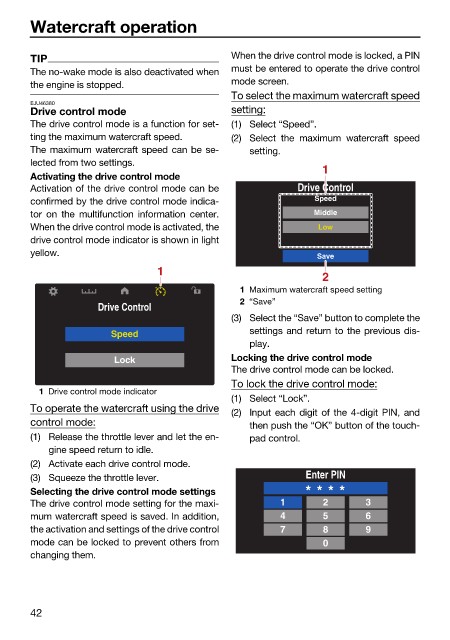
                                                              To select the maximum watercraft speed
                        EJU46380
                        Drive control mode                    setting:
                        The drive control mode is a function for set-  (1) Select “Speed”.
                        ting the maximum watercraft speed.    (2) Select the maximum  watercraft  speed
                        The maximum watercraft speed can be se-  setting.
                        lected from two settings.
                                                                               1
                        Activating the drive control mode
                        Activation of the drive control mode can be       Drive Control
                        confirmed by the drive control mode indica-          Speed
                        tor on  the multifunction information center.        Middle
                        When the drive control mode is activated, the         Low
                        drive control mode indicator is shown in light
                        yellow.
                                                                              Save
                                                1
                                                                               2
                                                               1 Maximum watercraft speed setting
                                                               2 “Save”
                                     Drive Control
                                                              (3) Select the “Save” button to complete the
                                                                 settings and return to the previous dis-
                                       Speed
                                                                 play.
                                        Lock                  Locking the drive control mode
                                                              The drive control mode can be locked.
                                                              To lock the drive control mode:
                          1 Drive control mode indicator
                                                              (1) Select “Lock”.
                        To operate the watercraft using the drive
                                                              (2) Input each digit of the 4-digit PIN, and
                        control mode:                            then push the “OK” button of the touch-
                        (1) Release the throttle lever and let the en-  pad control.
                            gine speed return to idle.
                        (2) Activate each drive control mode.
                        (3) Squeeze the throttle lever.                     Enter PIN
                        Selecting the drive control mode settings          * * * *
                        The drive control mode setting for the maxi-   1       2       3
                        mum watercraft speed is saved. In addition,    4       5       6
                        the activation and settings of the drive control  7    8       9
                        mode can be locked to prevent others from              0
                        changing them.


                        42

