


Page 59 - LIT-18626-13-97
P. 59
UF4N12E0.book  Page 51  Thursday, July 14, 2022  10:42 AM


                                                                 Instrument operation

                                                              EJU46290
                                                              Display
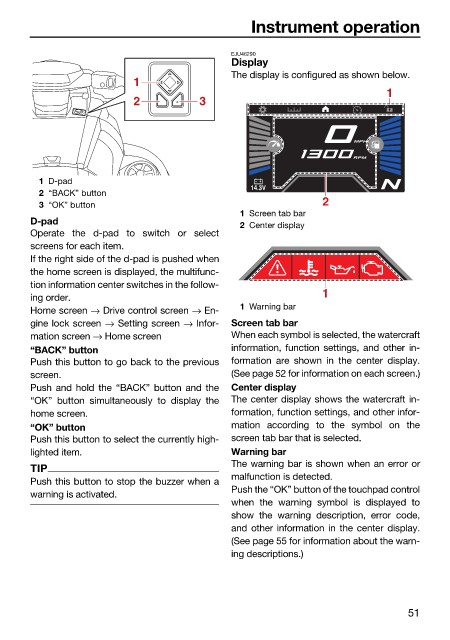
                                                              The display is configured as shown below.
                                           1
                                                                                           1
                                           2            3


                                                                                    MPH
                                                                                    RPM
                          1 D-pad
                                                                 14.3V
                          2 “BACK” button
                                                                               2
                          3 “OK” button
                                                               1 Screen tab bar
                        D-pad
                                                               2 Center display
                        Operate the  d-pad to switch or select
                        screens for each item.
                        If the right side of the d-pad is pushed when
                        the home screen is displayed, the multifunc-
                        tion information center switches in the follow-
                        ing order.                                             1
                        Home screen → Drive control screen → En-  1 Warning bar
                        gine lock screen → Setting screen → Infor-  Screen tab bar
                        mation screen → Home screen           When each symbol is selected, the watercraft
                        “BACK” button                         information, function settings, and other in-
                        Push this button to go back to the previous  formation are shown  in the center display.
                        screen.                               (See page 52 for information on each screen.)
                        Push and hold the  “BACK” button and the  Center display
                        “OK” button simultaneously to display the  The center display shows the watercraft in-
                        home screen.                          formation, function settings, and other infor-
                        “OK” button                           mation according  to the symbol on  the
                        Push this button to select the currently high-  screen tab bar that is selected.
                        lighted item.                         Warning bar
                                                              The warning bar is shown when an error or
                        TIP
                                                              malfunction is detected.
                        Push this button to stop the buzzer when a
                                                              Push the “OK” button of the touchpad control
                        warning is activated.
                                                              when  the warning symbol is displayed  to
                                                              show the warning  description, error  code,
                                                              and other information in the center display.
                                                              (See page 55 for information about the warn-
                                                              ing descriptions.)


                                                                                               51

