


Page 65 - LIT-18626-14-57
P. 65
UF3X15E0.book Page 56 Friday, June 23, 2023 4:14 PM
Instrument operation
Tracks
You have reached your destination! Would you like to
stop navigation?
Stop Recording Track?
No Yes No Stop
1 1
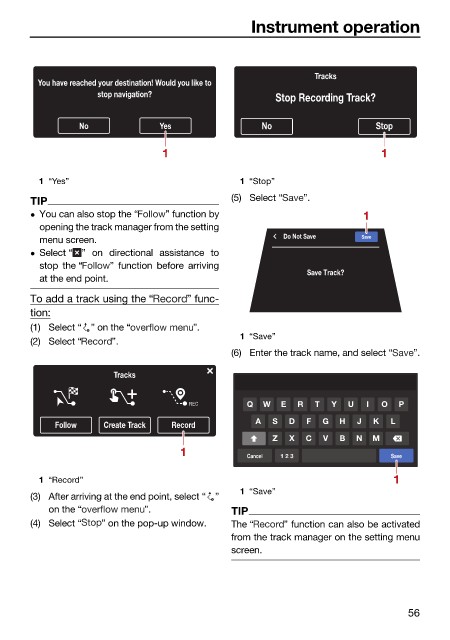
1 “Yes” 1 “Stop”
TIP (5) Select “ ”.
You can also stop the “ ” function by 1
opening the track manager from the setting
Do Not Save Save
menu screen.
Select “ ” on directional assistance to
stop the “ ” function before arriving
Save Track?
at the end point.
To add a track using the “ ” func-
tion:
(1) Select “ ” on the “ ”.
1 “Save”
(2) Select “ ”.
(6) Enter the track name, and select “ ”.
Tracks
REC Q W E R T Y U I O P
A S D F G H J K L
Follow Create Track Record
Z X C V B N M
1 Cancel 1 2 3 Save
1
1 “Record”
1 “Save”
(3) After arriving at the end point, select “ ”
on the “ ”. TIP
(4) Select “ ” on the pop-up window. The “ ” function can also be activated
from the track manager on the setting menu
screen.
56

