


Page 61 - LIT-18626-14-57
P. 61
UF3X15E0.book  Page 52  Friday, June 23, 2023  4:14 PM


                                                                 Instrument operation

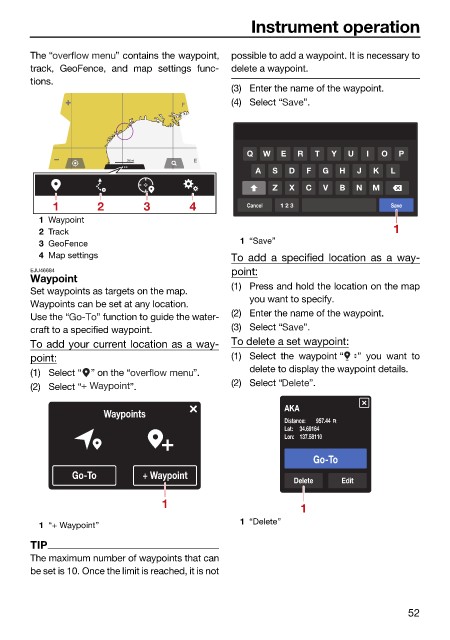
                        The “           ” contains the waypoint,  possible to add a waypoint. It is necessary to
                        track, GeoFence,  and map settings func-  delete a waypoint.
                        tions.
                                                              (3) Enter the name of the waypoint.
                                                    F         (4) Select “  ”.


                                                                 Q  W  E  R  T  Y  U   I  O  P
                                                       E
                                          200 mi
                                                                  A  S  D   F  G  H  J  K  L
                                                                     Z  X   C  V  B  N  M
                            1        2       3        4          Cancel  1 2 3             Save

                          1 Waypoint
                          2 Track                                                           1
                          3 GeoFence                           1 “Save”
                          4 Map settings                      To add  a specified location  as  a way-
                        EJU46684                              point:
                        Waypoint
                        Set waypoints as targets on the map.  (1) Press and hold the location on the map
                                                                 you want to specify.
                        Waypoints can be set at any location.
                        Use the “    ” function to guide the water-  (2) Enter the name of the waypoint.
                        craft to a specified waypoint.        (3) Select “  ”.
                        To add your current location as a way-  To delete a set waypoint:
                        point:                                (1) Select the waypoint “  ” you want to
                        (1) Select “ ” on the “        ”.        delete to display the waypoint details.
                                                              (2) Select “  ”.
                        (2) Select “       ”.
                                      Waypoints                         AKA
                                                                        Distance:  957.44 Ft
                                                                        Lat: 34.69164
                                                                        Lon: 137.58110
                                                                             Go-To
                                Go-To        + Waypoint
                                                                         Delete   Edit
                                                 1                         1

                                                               1 “Delete”
                          1 “+ Waypoint”
                        TIP
                        The maximum number of waypoints that can
                        be set is 10. Once the limit is reached, it is not


                                                                                               52

