


Page 56 - LIT-18626-14-58
P. 56
UF7K10E0.book Page 47 Thursday, July 13, 2023 5:40 PM
Instrument operation
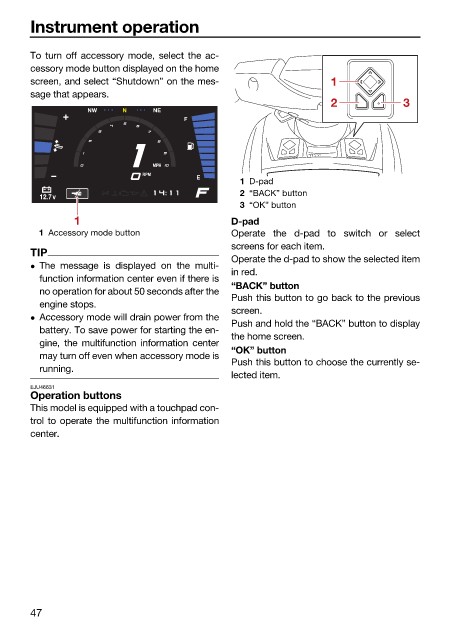
To turn off accessory mode, select the ac-
cessory mode button displayed on the home
screen, and select “Shutdown” on the mes- 1
sage that appears.
2 3
NW N NE
F
MPH
RPM
E
1 D-pad
2 “BACK” button
12.7v
3 “OK” button
1 D-pad
1 Accessory mode button Operate the d-pad to switch or select
screens for each item.
TIP
Operate the d-pad to show the selected item
The message is displayed on the multi-
in red.
function information center even if there is
“BACK” button
no operation for about 50 seconds after the
Push this button to go back to the previous
engine stops.
screen.
Accessory mode will drain power from the
Push and hold the “BACK” button to display
battery. To save power for starting the en-
the home screen.
gine, the multifunction information center
“OK” button
may turn off even when accessory mode is
Push this button to choose the currently se-
running.
lected item.
EJU46631
Operation buttons
This model is equipped with a touchpad con-
trol to operate the multifunction information
center.
47

