


Page 51 - LIT-18626-14-58
P. 51
UF7K10E0.book Page 42 Thursday, July 13, 2023 5:40 PM
Watercraft operation
EJU47361 (2) Activate each drive control mode.
Drive control mode
(3) Squeeze the throttle lever.
The drive control mode is a function for set-
Setting the custom mode
ting the maximum watercraft speed and ac-
The custom mode settings for the maximum
celeration for stable towing, and to adjust the
watercraft speed and acceleration are saved.
trim angle automatically.
In addition, the activation and settings of the
The drive control mode can be selected from
custom mode can be locked to prevent oth-
the following.
ers from changing them.
“ ”
When the lock is set, the custom settings
“ ”
cannot be changed. Release the lock to
“ ”
change the settings.
“ ”
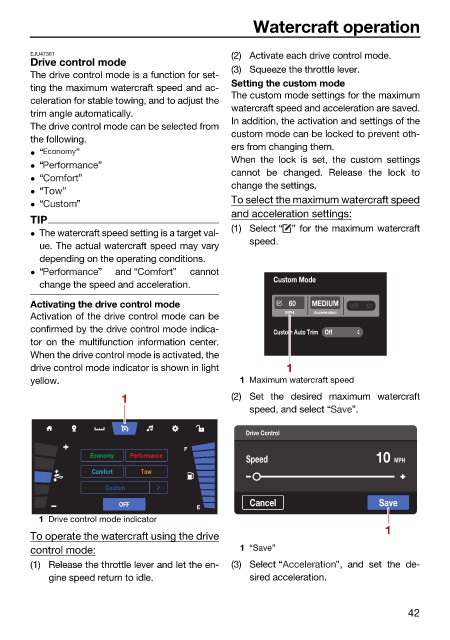
To select the maximum watercraft speed
“ ”
and acceleration settings:
TIP
(1) Select “ ” for the maximum watercraft
The watercraft speed setting is a target val-
speed.
ue. The actual watercraft speed may vary
depending on the operating conditions.
“ ” and “ ” cannot
Custom Mode
change the speed and acceleration.
Activating the drive control mode 60 MEDIUM OFF
MPH Acceleration
Activation of the drive control mode can be
confirmed by the drive control mode indica- Custom Auto Trim Off
tor on the multifunction information center.
When the drive control mode is activated, the
drive control mode indicator is shown in light 1
yellow. 1 Maximum watercraft speed
1 (2) Set the desired maximum watercraft
speed, and select “ ”.
Drive Control
F
Economy Performance
Speed 10 MPH
Comfort Tow
Custom
OFF E Cancel Save
1 Drive control mode indicator
1
To operate the watercraft using the drive
control mode: 1 “Save”
(1) Release the throttle lever and let the en- (3) Select “ ”, and set the de-
gine speed return to idle. sired acceleration.
42

