Page 62 - LIT-18626-14-58
P. 62

UF7K10E0.book  Page 53  Thursday, July 13, 2023  5:40 PM


                        Instrument operation


                        TIP                                   (4) Select “  ”.
                        Selecting “   ” activates the  waypoint  TIP
                        manager. See page 65 for details about the   If the display symbol changes  color,
                        waypoint manager.                      the “   ” button is not displayed.
                                                               You can also edit or delete waypoints by
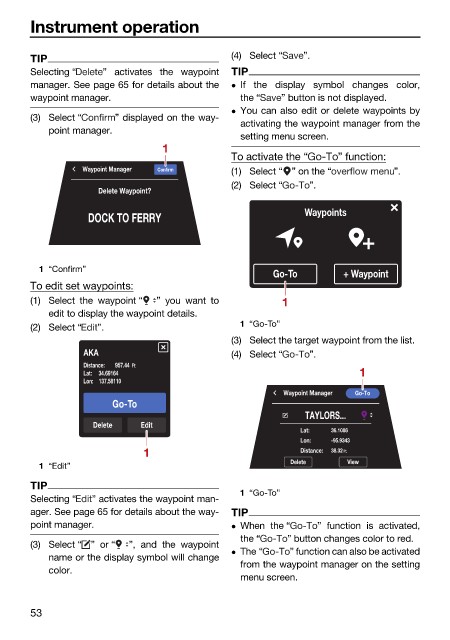
                        (3) Select “    ” displayed on the way-
                                                               activating the waypoint manager from the
                            point manager.
                                                               setting menu screen.
                                                 1
                                                              To activate the “   ” function:
                                  Waypoint Manager  Confirm    (1) Select “ ” on the “       ”.
                                                              (2) Select “  ”.
                                     Delete Waypoint?

                                   DOCK TO FERRY                           Waypoints


                          1 “Confirm”
                                                                     Go-To         + Waypoint
                        To edit set waypoints:
                        (1) Select  the waypoint “  ” you  want to     1
                            edit to display the waypoint details.
                        (2) Select “  ”.                       1 “Go-To”
                                                              (3) Select the target waypoint from the list.
                                  AKA                         (4) Select “  ”.
                                  Distance:  957.44 Ft
                                  Lat: 34.69164                                       1
                                  Lon: 137.58110
                                                                       Waypoint Manager  Go-To
                                        Go-To
                                                                           TAYLORS...
                                    Delete   Edit
                                                                           Lat:  36.1086
                                                                           Lon:  -95.9343
                                             1                             Distance:  38.32 Ft.
                                                                         Delete    View
                          1 “Edit”
                        TIP
                                                               1 “Go-To”
                        Selecting “  ” activates the waypoint man-
                        ager. See page 65 for details about the way-  TIP
                        point manager.                         When the “    ” function is activated,
                                                               the “    ” button changes color to red.
                        (3) Select “ ” or “  ”, and  the waypoint
                                                               The “    ” function can also be activated
                            name or the display symbol will change
                                                               from the waypoint manager on the setting
                            color.
                                                               menu screen.
                        53
   57   58   59   60   61   62   63   64   65   66   67