


Page 64 - LIT-18626-14-58
P. 64
UF7K10E0.book  Page 55  Thursday, July 13, 2023  5:40 PM


                        Instrument operation


                                                                                      1
                                                      F
                                                                       Track Manager  Follow

                                                                           DOCK TO...
                                                                       Distance:   83.94 Ft.
                                          1000 ft        E
                                                                         Delete    Shown
                          Cancel                       Done
                                                       1
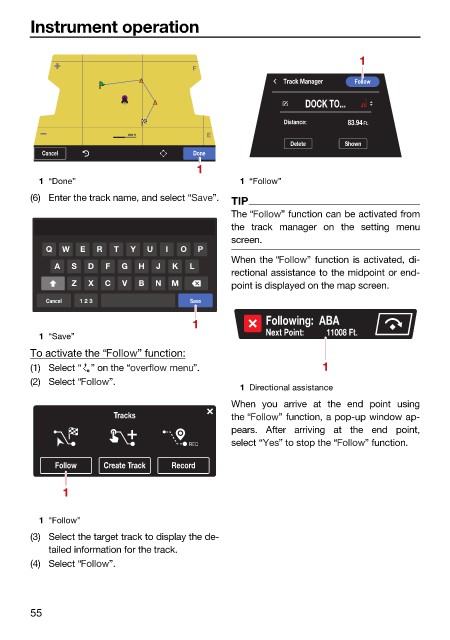
                          1 “Done”                             1 “Follow”
                        (6) Enter the track name, and select “  ”.  TIP
                                                              The “    ” function can be activated from
                                                              the track manager on the setting  menu
                                                              screen.
                           Q  W   E  R  T  Y  U  I  O  P
                                                              When the “    ” function is activated, di-
                             A  S  D  F  G  H   J  K  L
                                                              rectional assistance to the midpoint or end-
                                Z  X  C  V  B   N  M          point is displayed on the map screen.
                           Cancel  1 2 3              Save
                                                      1             Following:  ABA
                          1 “Save”                                  Next Point:           11008 Ft.
                        To activate the “   ” function:
                        (1) Select “ ” on the “        ”.                      1
                        (2) Select “   ”.
                                                               1 Directional assistance
                                                              When you arrive at the end  point using
                                        Tracks                the “   ” function, a pop-up window ap-
                                                              pears. After arriving at the end point,
                                                      REC     select “  ” to stop the “  ” function.
                             Follow   Create Track  Record

                              1


                          1 “Follow”
                        (3) Select the target track to display the de-
                            tailed information for the track.
                        (4) Select “   ”.


                        55

