


Page 104 - LIT-18626-15-24
P. 104
UF7M11E0.book Page 94 Friday, June 7, 2024 11:25 AM
Care and storage
ventilated. Always shield your eyes when Checking the battery voltage and charging
working near batteries. the battery
Keep out of the reach of children. It is recommended to have a Yamaha dealer
Antidotes check the battery voltage and charge the bat-
External: Flush with water. tery. Have a Yamaha dealer charge the bat-
Internal: Drink large quantities of water or tery as soon as possible if it seems to have
milk. Follow with milk of magnesia, beaten discharged. Keep in mind that the battery
egg, or vegetable oil. Call a physician im- tends to discharge more quickly if the vehicle
mediately. is equipped with optional electrical accesso-
Eyes: Flush with water for 15 minutes and ries. NOTICE: To charge a VRLA (Valve
get prompt medical attention. Regulated Lead Acid) battery, a special
(constant-voltage) battery charger is re-
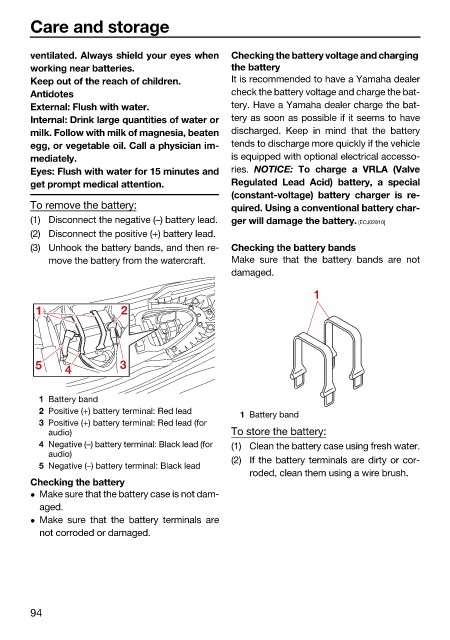
To remove the battery: quired. Using a conventional battery char-
(1) Disconnect the negative (–) battery lead. ger will damage the battery. [ECJ02810]
(2) Disconnect the positive (+) battery lead.
(3) Unhook the battery bands, and then re- Checking the battery bands
move the battery from the watercraft. Make sure that the battery bands are not
damaged.
1
1 2
5 4 3
1 Battery band
2 Positive (+) battery terminal: Red lead
1 Battery band
3 Positive (+) battery terminal: Red lead (for
audio) To store the battery:
4 Negative (–) battery terminal: Black lead (for (1) Clean the battery case using fresh water.
audio)
(2) If the battery terminals are dirty or cor-
5 Negative (–) battery terminal: Black lead
roded, clean them using a wire brush.
Checking the battery
Make sure that the battery case is not dam-
aged.
Make sure that the battery terminals are
not corroded or damaged.
94

