


Page 56 - LIT-18626-15-24
P. 56
UF7M11E0.book Page 46 Friday, June 7, 2024 11:25 AM
Instrument operation
EJU47481 EJU47401
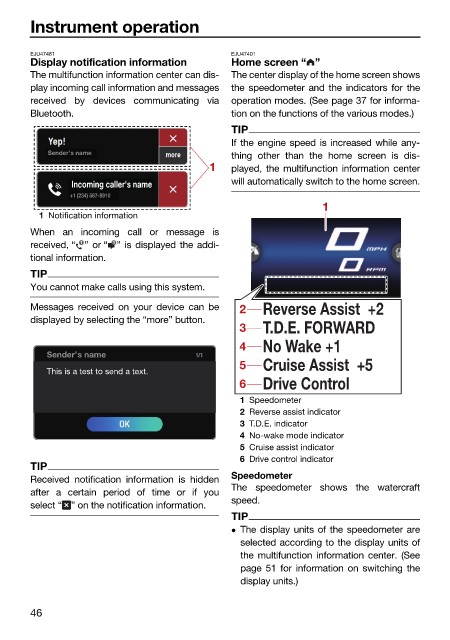
Display notification information Home screen “ ”
The multifunction information center can dis- The center display of the home screen shows
play incoming call information and messages the speedometer and the indicators for the
received by devices communicating via operation modes. (See page 37 for informa-
Bluetooth. tion on the functions of the various modes.)
TIP
If the engine speed is increased while any-
Sender’s name
thing other than the home screen is dis-
1 played, the multifunction information center
Incoming caller's name will automatically switch to the home screen.
+1 (234) 567-8910
1
1 Notification information
When an incoming call or message is
1
1
received, “ ” or “ ” is displayed the addi- km/h
tional information.
RPM
TIP
You cannot make calls using this system.
Messages received on your device can be 2 Reverse Assist +2
displayed by selecting the “more” button.
3 T.D.E. FORWARD
4 No Wake +1
Sender’s name
5 Cruise Assist +5
This is a test to send a text.
6 Drive Control
1 Speedometer
2 Reverse assist indicator
3 T.D.E. indicator
4 No-wake mode indicator
5 Cruise assist indicator
6 Drive control indicator
TIP
Speedometer
Received notification information is hidden
The speedometer shows the watercraft
after a certain period of time or if you
speed.
select “ ” on the notification information.
TIP
The display units of the speedometer are
selected according to the display units of
the multifunction information center. (See
page 51 for information on switching the
display units.)
46

