


Page 57 - LIT-18626-15-24
P. 57
UF7M11E0.book Page 47 Friday, June 7, 2024 11:25 AM
Instrument operation
When operating the watercraft in reverse,
or when moving forward or in reverse at a
very low speed using the T.D.E., “0” will be
displayed on the speedometer.
1 0.7 1.6 4
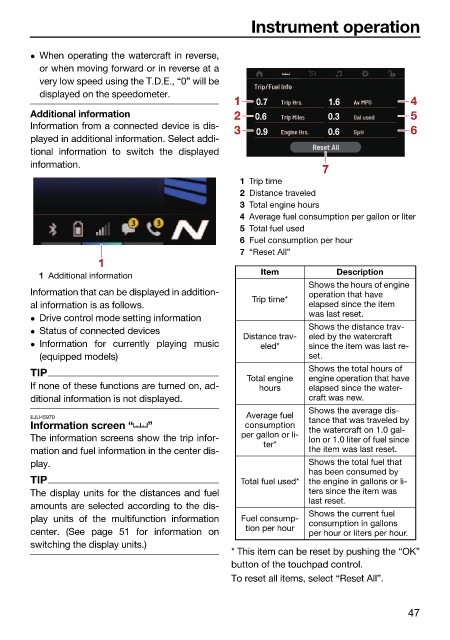
Additional information 2 0.6 0.3 5
Information from a connected device is dis-
3 0.9 0.6 6
played in additional information. Select addi-
tional information to switch the displayed
information.
7
1 Trip time
2 Distance traveled
3 Total engine hours
4 Average fuel consumption per gallon or liter
5 Total fuel used
6 Fuel consumption per hour
7 “Reset All”
1
Item Description
1 Additional information
Shows the hours of engine
Information that can be displayed in addition- operation that have
Trip time*
al information is as follows. elapsed since the item
Drive control mode setting information was last reset.
Status of connected devices Shows the distance trav-
Distance trav- eled by the watercraft
Information for currently playing music eled* since the item was last re-
(equipped models) set.
TIP Shows the total hours of
Total engine engine operation that have
If none of these functions are turned on, ad- hours elapsed since the water-
ditional information is not displayed. craft was new.
Shows the average dis-
EJU45970 Average fuel tance that was traveled by
Information screen “ ” consumption the watercraft on 1.0 gal-
The information screens show the trip infor- per gallon or li- lon or 1.0 liter of fuel since
ter*
mation and fuel information in the center dis- the item was last reset.
play. Shows the total fuel that
has been consumed by
TIP Total fuel used* the engine in gallons or li-
The display units for the distances and fuel ters since the item was
last reset.
amounts are selected according to the dis-
Shows the current fuel
play units of the multifunction information Fuel consump- consumption in gallons
center. (See page 51 for information on tion per hour per hour or liters per hour.
switching the display units.)
* This item can be reset by pushing the “OK”
button of the touchpad control.
To reset all items, select “Reset All”.
47

