


Page 66 - LIT-18626-13-38
P. 66
UF3X13E0.book  Page 57  Tuesday, September 28, 2021  12:57 PM


                        Instrument operation

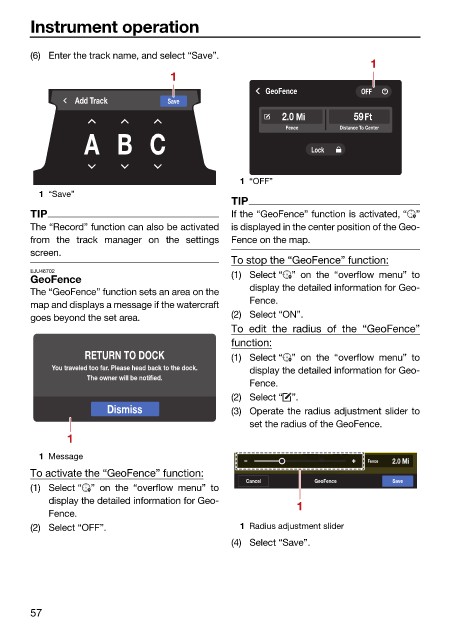
                        (6) Enter the track name, and select “Save”.
                                                                                        1
                                                  1
                                                                    GeoFence          OFF
                                 Add Track        Save
                                                                       2.0 Mi       59Ft
                                                                        Fence     Distance To Center
                                  A B C                                      Lock


                                                               1 “OFF”
                          1 “Save”
                                                              TIP
                        TIP                                   If the “GeoFence” function is activated, “ ”
                        The “Record” function can also be activated  is displayed in the center position of the Geo-
                        from the  track manager on  the settings  Fence on the map.
                        screen.
                                                              To stop the “GeoFence” function:
                        EJU46702                              (1) Select “ ” on the  “overflow  menu” to
                        GeoFence
                                                                 display the detailed information for Geo-
                        The “GeoFence” function sets an area on the
                                                                 Fence.
                        map and displays a message if the watercraft
                        goes beyond the set area.             (2) Select “ON”.
                                                              To edit the radius of the “GeoFence”
                                                              function:
                                  RETURN TO DOCK              (1) Select “ ” on the  “overflow  menu” to
                            You traveled too far. Please head back to the dock.  display the detailed information for Geo-
                                   The owner will be notified.
                                                                 Fence.
                                                              (2) Select “ ”.
                                       Dismiss                (3) Operate the radius adjustment slider to
                                                                 set the radius of the GeoFence.
                               1
                          1 Message
                                                                              W W      Fence  2.0 Mi
                        To activate the “GeoFence” function:
                                                                Cancel       GeoFence       Save
                        (1) Select “ ”  on the “overflow menu”  to
                            display the detailed information for Geo-
                                                                          1
                            Fence.
                        (2) Select “OFF”.                      1 Radius adjustment slider
                                                              (4) Select “Save”.


                        57

