Page 75 - LIT-18626-13-38
P. 75

UF3X13E0.book  Page 66  Tuesday, September 28, 2021  12:57 PM


                                                                 Instrument operation

                                                              tailed information on the GeoFence, see page
                                                              57.
                                 Map Settings
                                                              EJU46850
                                                              Waypoint manager (“Waypoints”)
                                Geofence
                                                              Waypoint manager manages registered way-
                                                              points.
                                Waypoints
                                                              The  following settings can  be confirmed in
                                Tracks                        the waypoint manager.
                                                               Display a list of registered waypoints
                                Satellite Status
                                                               Display detailed information for registered
                        EJU46840                               waypoints
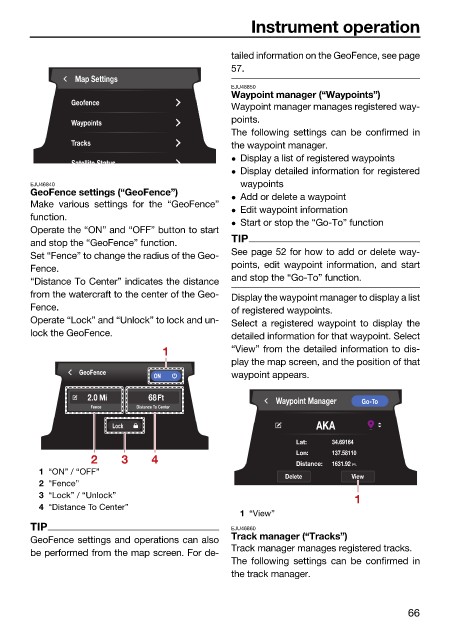
                        GeoFence settings (“GeoFence”)         Add or delete a waypoint
                        Make various settings for the “GeoFence”
                                                               Edit waypoint information
                        function.
                                                               Start or stop the “Go-To” function
                        Operate the “ON” and “OFF” button to start
                                                              TIP
                        and stop the “GeoFence” function.
                        Set “Fence” to change the radius of the Geo-  See page 52 for how to add or delete way-
                        Fence.                                points, edit waypoint information, and start
                        “Distance To Center” indicates the distance  and stop the “Go-To” function.
                        from the watercraft to the center of the Geo-  Display the waypoint manager to display a list
                        Fence.                                of registered waypoints.
                        Operate “Lock” and “Unlock” to lock and un-  Select a registered  waypoint  to display  the
                        lock the GeoFence.                    detailed information for that waypoint. Select
                                                 1            “View” from the detailed information to dis-
                                                              play the map screen, and the position of that
                                 GeoFence
                                               ON             waypoint appears.
                                   2.0 Mi     68Ft                    Waypoint Manager  Go-To
                                   Fence    Distance To Center

                                        Lock                                 AKA
                                                                          Lat:  34.69164
                                                                          Lon:  137.58110
                                    2    3     4                          Distance:  1631.92  Ft.
                          1 “ON” / “OFF”
                                                                        Delete      View
                          2 “Fence”
                          3 “Lock” / “Unlock”                                        1
                          4 “Distance To Center”
                                                               1 “View”
                        TIP                                   EJU46860
                        GeoFence settings and operations can also  Track manager (“Tracks”)
                                                              Track manager manages registered tracks.
                        be performed from the map screen. For de-
                                                              The  following settings can  be confirmed in
                                                              the track manager.


                                                                                               66
   70   71   72   73   74   75   76   77   78   79   80