Page 56 - LIT-18626-14-57
P. 56

UF3X15E0.book  Page 47  Friday, June 23, 2023  4:14 PM


                        Instrument operation

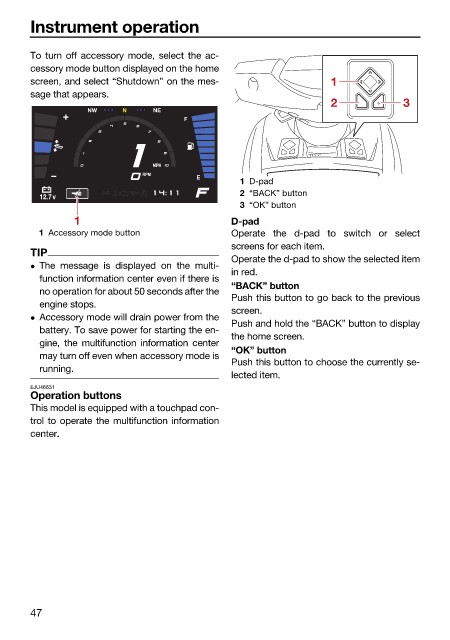
                        To turn off accessory mode, select the ac-
                        cessory mode button displayed on the home
                        screen, and select “Shutdown” on the mes-               1
                        sage that appears.
                                                                                2             3
                                   NW    N     NE
                                                     F


                                               MPH
                                             RPM
                                                       E
                                                               1 D-pad
                                                               2 “BACK” button
                          12.7v
                                                               3 “OK” button
                                1                             D-pad
                          1 Accessory mode button             Operate the d-pad to switch or select
                                                              screens for each item.
                        TIP
                                                              Operate the d-pad to show the selected item
                         The message is displayed on the multi-
                                                              in red.
                          function information center even if there is
                                                              “BACK” button
                          no operation for about 50 seconds after the
                                                              Push this button to go back to the previous
                          engine stops.
                                                              screen.
                         Accessory mode will drain power from the
                                                              Push and hold the “BACK” button to display
                          battery. To save power for starting the en-
                                                              the home screen.
                          gine, the  multifunction information  center
                                                              “OK” button
                          may turn off even when accessory mode is
                                                              Push this button to choose the currently se-
                          running.
                                                              lected item.
                        EJU46631
                        Operation buttons
                        This model is equipped with a touchpad con-
                        trol to operate the multifunction information
                        center.


                        47
   51   52   53   54   55   56   57   58   59   60   61