


Page 61 - LIT-18626-15-20
P. 61
UF3X16E0.book  Page 49  Wednesday, July 17, 2024  9:11 AM


                                                                 Instrument operation


                        TIP
                        The accuracy of the fuel level meter varies
                                                                                           1  /  1
                        depending on the operating conditions. Use  Sender’s name
                        this function as a reference only.       This is a test to send a text.

                        EJU47331
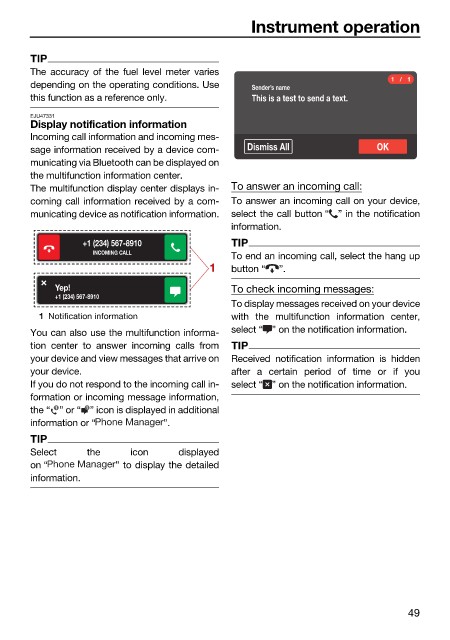
                        Display notification information
                        Incoming call information and incoming mes-
                        sage information received by a device com-  Dismiss All          OK
                        municating via Bluetooth can be displayed on
                        the multifunction information center.
                        The multifunction display center displays in-  To answer an incoming call:
                        coming call information received by a com-  To answer an incoming call on your device,
                        municating device as notification information.  select the call button “ ” in the notification
                                                              information.
                                  +1 (234) 567-8910           TIP
                                    INCOMING CALL
                                                              To end an incoming call, select the hang up
                                                          1   button “  ”.
                             Yep!                             To check incoming messages:
                             +1 (234) 567-8910
                                                              To display messages received on your device
                          1 Notification information          with the multifunction information  center,
                        You can also use the multifunction informa-  select “ ” on the notification information.
                        tion center  to answer incoming calls from  TIP
                        your device and view messages that arrive on  Received notification information is hidden
                        your device.                          after a  certain  period of  time or if  you
                        If you do not respond to the incoming call in-  select “ ” on the notification information.
                        formation or incoming message information,
                        the “ ” or “ ” icon is displayed in additional
                             1
                                   1
                        information or “         ”.
                        TIP
                        Select     the     icon     displayed
                        on “            ” to display the detailed
                        information.


                                                                                               49

