


Page 65 - LIT-18626-15-21
P. 65
UF7K11E0.book Page 53 Monday, June 17, 2024 7:03 PM
Instrument operation
TIP (4) Select “ ”.
Selecting “ ” activates the waypoint TIP
manager. See page 67 for details about the If the display symbol changes color,
waypoint manager. the “ ” button is not displayed.
You can also edit or delete waypoints by
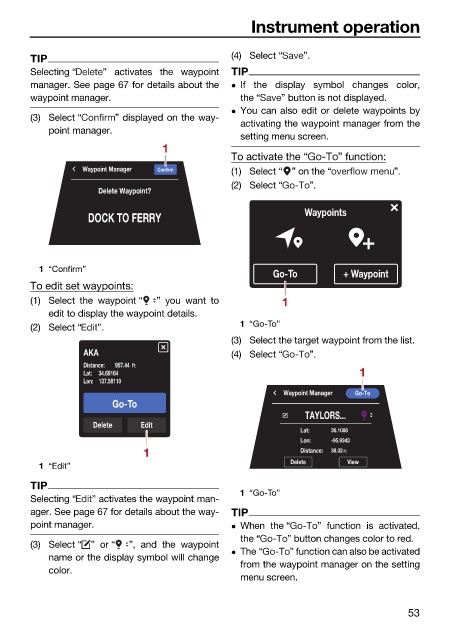
(3) Select “ ” displayed on the way-
activating the waypoint manager from the
point manager.
setting menu screen.
1
To activate the “ ” function:
Waypoint Manager Confirm (1) Select “ ” on the “ ”.
(2) Select “ ”.
Delete Waypoint?
DOCK TO FERRY Waypoints
1 “Confirm”
Go-To + Waypoint
To edit set waypoints:
(1) Select the waypoint “ ” you want to 1
edit to display the waypoint details.
(2) Select “ ”. 1 “Go-To”
(3) Select the target waypoint from the list.
AKA (4) Select “ ”.
Distance: 957.44 Ft
Lat: 34.69164 1
Lon: 137.58110
Waypoint Manager Go-To
Go-To
TAYLORS...
Delete Edit
Lat: 36.1086
Lon: -95.9343
1 Distance: 38.32 Ft.
Delete View
1 “Edit”
TIP
1 “Go-To”
Selecting “ ” activates the waypoint man-
ager. See page 67 for details about the way- TIP
point manager. When the “ ” function is activated,
the “ ” button changes color to red.
(3) Select “ ” or “ ”, and the waypoint
The “ ” function can also be activated
name or the display symbol will change
from the waypoint manager on the setting
color.
menu screen.
53

