


Page 69 - LIT-18626-15-21
P. 69
UF7K11E0.book  Page 57  Monday, June 17, 2024  7:03 PM


                                                                 Instrument operation

                        EJU46704
                        GeoFence                                                        1
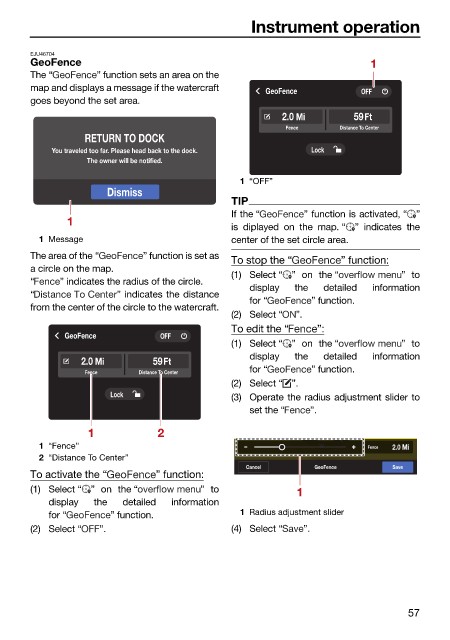
                        The “        ” function sets an area on the
                        map and displays a message if the watercraft  GeoFence        OFF
                        goes beyond the set area.
                                                                       2.0 Mi       59Ft
                                                                        Fence     Distance To Center
                                  RETURN TO DOCK
                            You traveled too far. Please head back to the dock.  Lock
                                   The owner will be notified.
                                                               1 “OFF”
                                       Dismiss
                                                              TIP
                                                              If the “     ” function is activated, “ ”
                               1
                                                              is diplayed  on the map. “ ”  indicates  the
                          1 Message                           center of the set circle area.
                        The area of the “    ” function is set as
                                                              To stop the “       ” function:
                        a circle on the map.
                                                              (1) Select “ ” on the “        ”  to
                        “     ” indicates the radius of the circle.
                                                                 display  the  detailed  information
                        “               ” indicates the distance
                                                                 for “       ” function.
                        from the center of the circle to the watercraft.
                                                              (2) Select “  ”.
                                                              To edit the “   ”:
                               GeoFence         OFF
                                                              (1) Select “ ” on the “        ”  to
                                                                 display  the  detailed  information
                                  2.0 Mi       59Ft
                                                                 for “       ” function.
                                  Fence     Distance To Center
                                                              (2) Select “ ”.
                                       Lock                   (3) Operate the radius adjustment slider to
                                                                 set the “  ”.
                                   1            2
                          1 “Fence”                                           W W      Fence  2.0 Mi
                          2 “Distance To Center”
                                                                Cancel       GeoFence       Save
                        To activate the “       ” function:
                        (1) Select “ ”  on the “        ” to              1
                            display  the  detailed  information
                            for “      ” function.             1 Radius adjustment slider
                        (2) Select “  ”.                      (4) Select “  ”.


                                                                                               57

