Page 57 - LIT-18626-15-22
P. 57

UF4P15E0.book  Page 47  Wednesday, June 26, 2024  11:56 AM


                                                                 Instrument operation

                                                              D-pad
                                                              Operate the  d-pad to switch or select
                                                              screens for each item.
                                                              If the right side of the d-pad is pushed when
                                                              the home screen is displayed, the multifunc-
                                                              tion information center switches in the follow-
                                                              ing order.
                                                              Home screen → Information screen → Drive
                                                              control screen  → Media screen  → Setting
                                                       1      screen → Engine lock screen
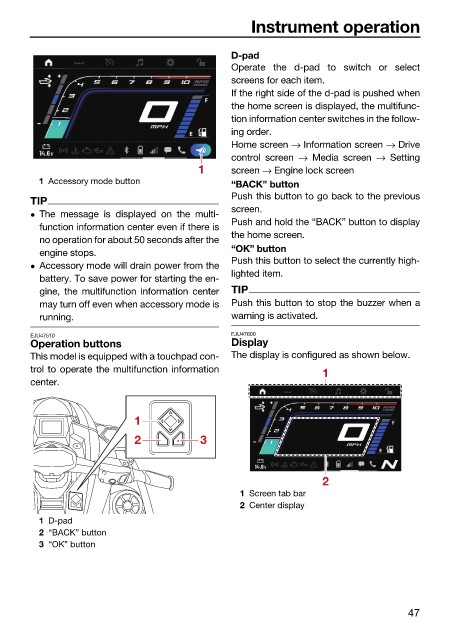
                          1 Accessory mode button
                                                              “BACK” button
                                                              Push this button to go back to the previous
                        TIP
                                                              screen.
                         The message is displayed  on  the  multi-
                                                              Push and hold the “BACK” button to display
                          function information center even if there is
                                                              the home screen.
                          no operation for about 50 seconds after the
                                                              “OK” button
                          engine stops.
                                                              Push this button to select the currently high-
                         Accessory mode will drain power from the
                                                              lighted item.
                          battery. To save power for starting the en-
                          gine, the multifunction information center  TIP
                          may turn off even when accessory mode is  Push this button to stop the buzzer when a
                          running.                            warning is activated.
                        EJU47510                              EJU47600
                        Operation buttons                     Display
                        This model is equipped with a touchpad con-  The display is configured as shown below.
                        trol to operate the multifunction information          1
                        center.


                                            1
                                            2           3


                                                                               2
                                                               1 Screen tab bar
                                                               2 Center display
                          1 D-pad
                          2 “BACK” button
                          3 “OK” button


                                                                                               47
   52   53   54   55   56   57   58   59   60   61   62