


Page 62 - LIT-18626-15-22
P. 62
UF4P15E0.book Page 52 Wednesday, June 26, 2024 11:56 AM
Instrument operation
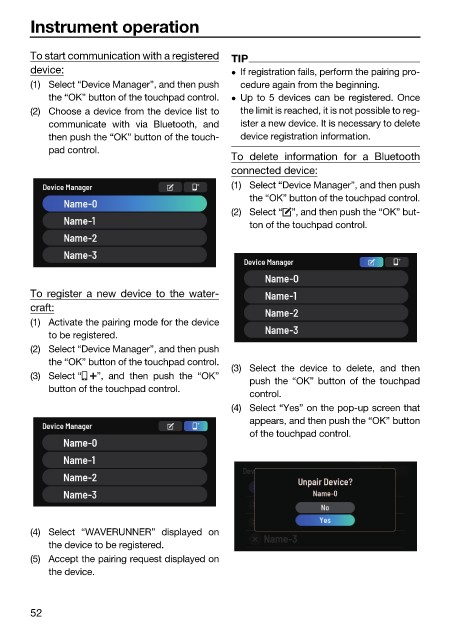
To start communication with a registered TIP
device: If registration fails, perform the pairing pro-
(1) Select “Device Manager”, and then push cedure again from the beginning.
the “OK” button of the touchpad control. Up to 5 devices can be registered. Once
(2) Choose a device from the device list to the limit is reached, it is not possible to reg-
communicate with via Bluetooth, and ister a new device. It is necessary to delete
then push the “OK” button of the touch- device registration information.
pad control.
To delete information for a Bluetooth
connected device:
(1) Select “Device Manager”, and then push
the “OK” button of the touchpad control.
(2) Select “ ”, and then push the “OK” but-
ton of the touchpad control.
To register a new device to the water-
craft:
(1) Activate the pairing mode for the device
to be registered.
(2) Select “Device Manager”, and then push
the “OK” button of the touchpad control.
(3) Select the device to delete, and then
(3) Select “ ”, and then push the “OK”
push the “OK” button of the touchpad
button of the touchpad control.
control.
(4) Select “Yes” on the pop-up screen that
appears, and then push the “OK” button
of the touchpad control.
(4) Select “WAVERUNNER” displayed on
the device to be registered.
(5) Accept the pairing request displayed on
the device.
52

