


Page 60 - LIT-18626-15-25
P. 60
UF4N14E0.book  Page 49  Friday, May 24, 2024  8:56 AM


                        Instrument operation

                        EJU47431
                            Multifunction information
                              center (VX DELUXE /
                           VX CRUISER / VX LIMITED)
                        The multifunction information center displays
                        various watercraft information.
                        The multifunction information center can turn                          1
                        the various functions on or off or change set-
                        tings by using the d-pad of the touchpad
                        control.
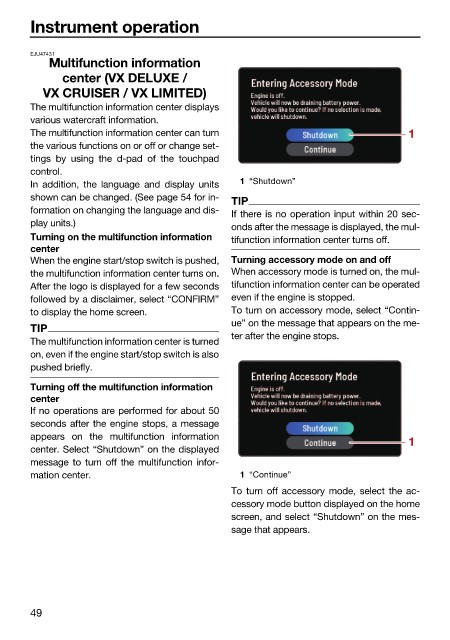
                        In  addition, the language and display units  1 “Shutdown”
                        shown can be changed. (See page 54 for in-  TIP
                        formation on changing the language and dis-  If there is no operation input within 20 sec-
                        play units.)                          onds after the message is displayed, the mul-
                        Turning on the multifunction information   tifunction information center turns off.
                        center
                        When the engine start/stop switch is pushed,  Turning accessory mode on and off
                        the multifunction information center turns on.  When accessory mode is turned on, the mul-
                        After the logo is displayed for a few seconds  tifunction information center can be operated
                        followed by a disclaimer, select “CONFIRM”  even if the engine is stopped.
                        to display the home screen.           To turn on accessory mode, select “Contin-
                                                              ue” on the message that appears on the me-
                        TIP
                                                              ter after the engine stops.
                        The multifunction information center is turned
                        on, even if the engine start/stop switch is also
                        pushed briefly.
                        Turning off the multifunction information
                        center
                        If no operations are performed for about 50
                        seconds after the engine stops, a message
                        appears on the multifunction  information
                                                                                               1
                        center. Select “Shutdown” on the displayed
                        message to turn off the multifunction infor-
                        mation center.                         1 “Continue”
                                                              To turn off accessory mode, select the ac-
                                                              cessory mode button displayed on the home
                                                              screen, and select “Shutdown” on the mes-
                                                              sage that appears.


                        49

