


Page 62 - LIT-18626-15-25
P. 62
UF4N14E0.book  Page 51  Friday, May 24, 2024  8:56 AM


                        Instrument operation


                                                                                            1


                                         1

                                                                  2           3            4
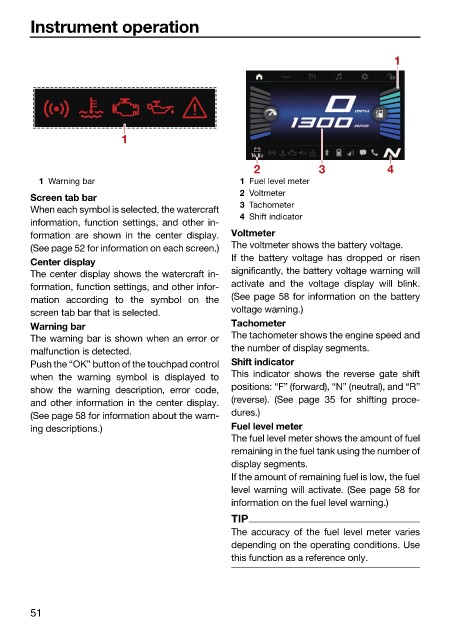
                          1 Warning bar                        1 Fuel level meter
                                                               2 Voltmeter
                        Screen tab bar
                                                               3 Tachometer
                        When each symbol is selected, the watercraft
                                                               4 Shift indicator
                        information, function settings, and other in-
                        formation are shown  in the center display.  Voltmeter
                                                              The voltmeter shows the battery voltage.
                        (See page 52 for information on each screen.)
                                                              If the battery voltage has dropped or  risen
                        Center display
                                                              significantly, the battery voltage warning will
                        The center display shows the watercraft in-
                                                              activate and the voltage display will blink.
                        formation, function settings, and other infor-
                                                              (See page 58 for information on the battery
                        mation  according  to the symbol on the
                                                              voltage warning.)
                        screen tab bar that is selected.
                        Warning bar                           Tachometer
                                                              The tachometer shows the engine speed and
                        The warning bar is shown when an error or
                                                              the number of display segments.
                        malfunction is detected.
                        Push the “OK” button of the touchpad control  Shift indicator
                                                              This indicator shows the  reverse  gate shift
                        when  the warning symbol is displayed  to
                                                              positions: “F” (forward), “N” (neutral), and “R”
                        show  the warning description,  error code,
                                                              (reverse).  (See page 35 for shifting proce-
                        and other information in the center display.
                                                              dures.)
                        (See page 58 for information about the warn-
                        ing descriptions.)                    Fuel level meter
                                                              The fuel level meter shows the amount of fuel
                                                              remaining in the fuel tank using the number of
                                                              display segments.
                                                              If the amount of remaining fuel is low, the fuel
                                                              level warning will activate. (See page 58 for
                                                              information on the fuel level warning.)
                                                              TIP
                                                              The accuracy of  the  fuel  level meter varies
                                                              depending on the operating conditions. Use
                                                              this function as a reference only.


                        51

