


Page 65 - LIT-18626-15-25
P. 65
UF4N14E0.book Page 54 Friday, May 24, 2024 8:56 AM
Instrument operation
EJU45170
Drive control mode screen “ ” TIP
The drive control mode screen shows the Selecting the play/pause button switches
setting screen for the drive control mode in the displayed button.
the center display. (See page 41 for informa- To connect the watercraft with a device via
tion on the drive control mode.) Bluetooth, see page 54.
EJU47450 EJU47491
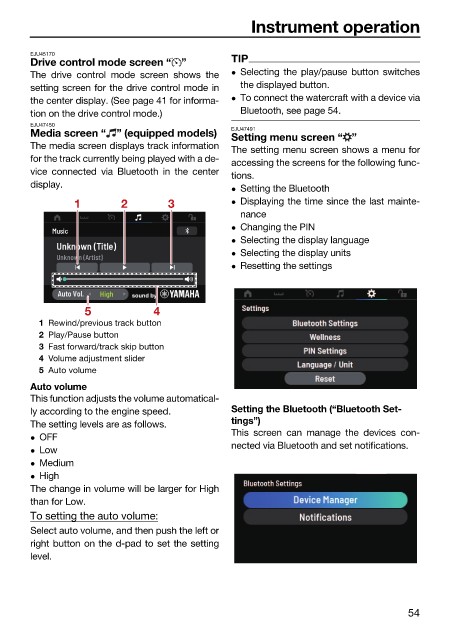
Media screen “ ” (equipped models)
Setting menu screen “ ”
The media screen displays track information The setting menu screen shows a menu for
for the track currently being played with a de- accessing the screens for the following func-
vice connected via Bluetooth in the center tions.
display. Setting the Bluetooth
1 2 3 Displaying the time since the last mainte-
nance
Changing the PIN
Selecting the display language
Selecting the display units
Resetting the settings
5 4
1 Rewind/previous track button
2 Play/Pause button
3 Fast forward/track skip button
4 Volume adjustment slider
5 Auto volume
Auto volume
This function adjusts the volume automatical-
ly according to the engine speed. Setting the Bluetooth (“Bluetooth Set-
The setting levels are as follows. tings”)
This screen can manage the devices con-
OFF
nected via Bluetooth and set notifications.
Low
Medium
High
The change in volume will be larger for High
than for Low.
To setting the auto volume:
Select auto volume, and then push the left or
right button on the d-pad to set the setting
level.
54

