


Page 47 - LIT-18626-15-26
P. 47
UF5R10E0.book  Page 38  Friday, September 27, 2024  5:44 PM


                                                                  Watercraft operation

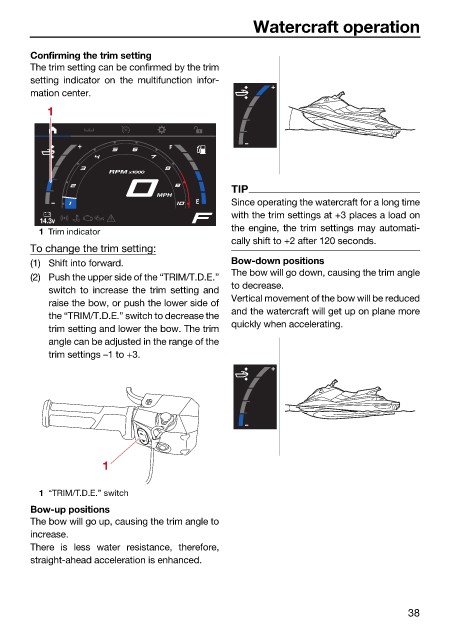
                        Confirming the trim setting
                        The trim setting can be confirmed by the trim
                        setting indicator on  the multifunction  infor-
                        mation center.
                           1


                                       RPM x1000
                                                              TIP
                                                MPH
                                                              Since operating the watercraft for a long time
                                                              with the trim settings at +3 places a load on
                          14.3v
                                                              the engine, the trim settings may automati-
                          1 Trim indicator
                                                              cally shift to +2 after 120 seconds.
                        To change the trim setting:
                        (1) Shift into forward.               Bow-down positions
                                                              The bow will go down, causing the trim angle
                        (2) Push the upper side of the “TRIM/T.D.E.”
                                                              to decrease.
                            switch to  increase the trim  setting  and
                                                              Vertical movement of the bow will be reduced
                            raise the bow, or push the lower side of
                                                              and the watercraft will get up on plane more
                            the “TRIM/T.D.E.” switch to decrease the
                                                              quickly when accelerating.
                            trim setting and lower the bow. The trim
                            angle can be adjusted in the range of the
                            trim settings –1 to +3.


                                      1

                          1 “TRIM/T.D.E.” switch
                        Bow-up positions
                        The bow will go up, causing the trim angle to
                        increase.
                        There is less water resistance, therefore,
                        straight-ahead acceleration is enhanced.


                                                                                               38

