Page 56 - LIT-18626-15-26
P. 56

UF5R10E0.book  Page 47  Friday, September 27, 2024  5:44 PM


                        Instrument operation


                        TIP                                        Item          Description
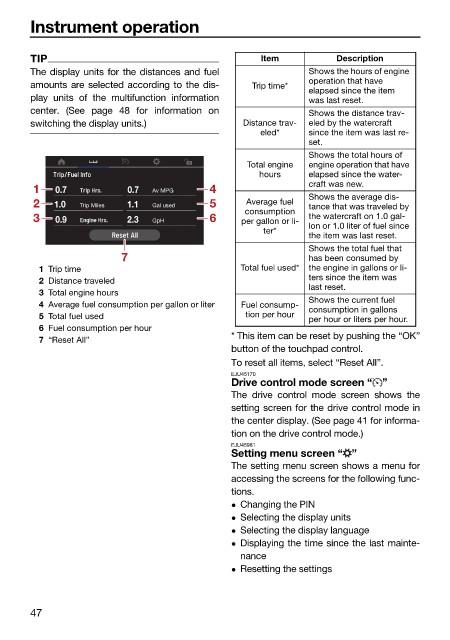
                        The display units for the distances and fuel        Shows the hours of engine
                        amounts are selected according to the dis-  Trip time*  operation that have
                                                                            elapsed since the item
                        play  units of  the multifunction information       was last reset.
                        center. (See page 48 for information on             Shows the distance trav-
                        switching the display units.)           Distance trav-  eled by the watercraft
                                                                   eled*    since the item was last re-
                                                                            set.
                                                                            Shows the total hours of
                                                                 Total engine   engine operation that have
                                                                   hours    elapsed since the water-
                                                                            craft was new.
                         1   0.7          0.7  Av MPG     4
                                                                            Shows the average dis-
                         2   1.0  Trip Miles  1.1  Gal used  5  Average fuel   tance that was traveled by
                                                                consumption
                         3   0.9          2.3  GpH        6    per gallon or li-  the watercraft on 1.0 gal-
                                                                    ter*    lon or 1.0 liter of fuel since
                                                                            the item was last reset.
                                                                            Shows the total fuel that
                                         7                                  has been consumed by
                          1 Trip time                          Total fuel used*  the engine in gallons or li-
                          2 Distance traveled                               ters since the item was
                                                                            last reset.
                          3 Total engine hours
                                                                            Shows the current fuel
                          4 Average fuel consumption per gallon or liter  Fuel consump-  consumption in gallons
                          5 Total fuel used                     tion per hour  per hour or liters per hour.
                          6 Fuel consumption per hour
                                                              * This item can be reset by pushing the “OK”
                          7 “Reset All”
                                                              button of the touchpad control.
                                                              To reset all items, select “Reset All”.
                                                              EJU45170
                                                              Drive control mode screen “ ”
                                                              The drive control mode screen  shows  the
                                                              setting screen for the drive control mode in
                                                              the center display. (See page 41 for informa-
                                                              tion on the drive control mode.)
                                                              EJU45981
                                                              Setting menu screen “ ”
                                                              The setting menu screen shows a menu for
                                                              accessing the screens for the following func-
                                                              tions.
                                                               Changing the PIN
                                                               Selecting the display units
                                                               Selecting the display language
                                                               Displaying the time since the last mainte-
                                                               nance
                                                               Resetting the settings


                        47
   51   52   53   54   55   56   57   58   59   60   61