Page 81 - LIT-18626-15-20
P. 81

UF3X16E0.book  Page 69  Wednesday, July 17, 2024  9:11 AM


                                                                 Instrument operation

                        EJU46880                               “NAV AIDS”
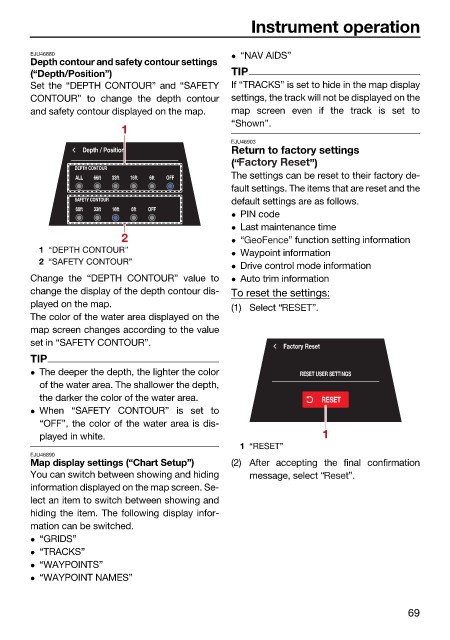
                        Depth contour and safety contour settings
                        (“Depth/Position”)                    TIP
                        Set the “DEPTH CONTOUR” and “SAFETY   If “TRACKS” is set to hide in the map display
                        CONTOUR” to change the depth contour  settings, the track will not be displayed on the
                        and safety contour displayed on the map.  map screen  even if the track is set  to
                                                              “Shown”.
                                         1
                                                              EJU46903
                                  Depth / Position            Return to factory settings
                                                              (“            ”)
                                DEPTH CONTOUR
                                 ALL  66ft  33ft  16ft  6ft  OFF  The settings can be reset to their factory de-
                                                              fault settings. The items that are reset and the
                                SAFETY CONTOUR                default settings are as follows.
                                 66ft  33ft  16ft  6ft  OFF
                                                               PIN code
                                                               Last maintenance time
                                         2                     “       ” function setting information
                          1 “DEPTH CONTOUR”                    Waypoint information
                          2 “SAFETY CONTOUR”
                                                               Drive control mode information
                        Change the “DEPTH CONTOUR” value to    Auto trim information
                        change the display of the depth contour dis-  To reset the settings:
                        played on the map.                    (1) Select “   ”.
                        The color of the water area displayed on the
                        map screen changes according to the value
                        set in “SAFETY CONTOUR”.                       Factory Reset
                        TIP
                         The deeper the depth, the lighter the color     RESET USER SETTINGS
                          of the water area. The shallower the depth,
                          the darker the color of the water area.             RESET
                         When “SAFETY  CONTOUR”  is set to
                          “OFF”, the color of the water area is dis-
                          played in white.                                     1
                                                               1 “RESET”
                        EJU46890
                        Map display settings (“Chart Setup”)  (2) After accepting the  final confirmation
                        You can switch between showing and hiding  message, select “  ”.
                        information displayed on the map screen. Se-
                        lect an item to switch between showing and
                        hiding the item. The following display infor-
                        mation can be switched.
                         “GRIDS”
                         “TRACKS”
                         “WAYPOINTS”
                         “WAYPOINT NAMES”


                                                                                               69
   76   77   78   79   80   81   82   83   84   85   86