Page 78 - LIT-18626-15-20
P. 78

UF3X16E0.book  Page 66  Wednesday, July 17, 2024  9:11 AM


                        Instrument operation


                        TIP
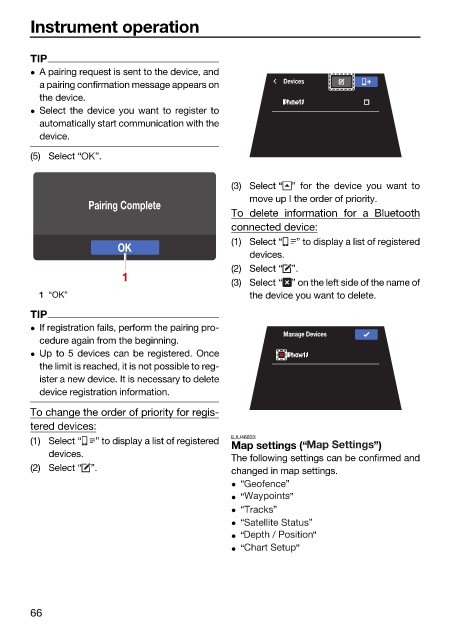
                         A pairing request is sent to the device, and
                          a pairing confirmation message appears on    Devices
                          the device.
                         Select the device you want to register to
                          automatically start communication with the
                          device.
                        (5) Select “  ”.

                                                              (3) Select “ ”  for the device you want  to
                                                                 move up I the order of priority.
                                   Pairing Complete
                                                              To delete information for  a  Bluetooth
                                                              connected device:
                                                              (1) Select “  ” to display a list of registered
                                         OK
                                                                 devices.
                                                              (2) Select “ ”.
                                         1
                                                              (3) Select “ ” on the left side of the name of
                          1 “OK”                                 the device you want to delete.

                        TIP
                         If registration fails, perform the pairing pro-
                                                                       Manage Devices
                          cedure again from the beginning.
                         Up to 5 devices can be registered. Once
                          the limit is reached, it is not possible to reg-
                          ister a new device. It is necessary to delete
                          device registration information.

                        To change the order of priority for regis-
                        tered devices:
                        (1) Select “  ” to display a list of registered  EJU46833
                                                              Map settings (“           ”)
                            devices.
                                                              The following settings can be confirmed and
                        (2) Select “ ”.                       changed in map settings.
                                                               “       ”
                                                               “        ”
                                                               “    ”
                                                               “           ”
                                                               “            ”
                                                               “         ”


                        66
   73   74   75   76   77   78   79   80   81   82   83