Page 64 - LIT-18626-13-39
P. 64

UF3V13E0.book  Page 55  Thursday, September 30, 2021  2:21 PM


                        Instrument operation

                        possible to create a track. It is necessary to
                        delete a track.                                                 1
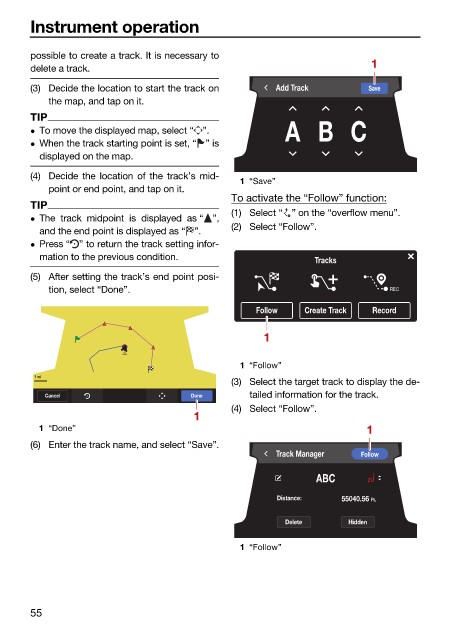
                        (3) Decide the location to start the track on  Add Track       Save
                            the map, and tap on it.
                        TIP
                                                                        A B C
                         To move the displayed map, select “ ”.
                         When the track starting point is set, “ ” is
                          displayed on the map.
                        (4) Decide the location of the track’s mid-
                                                               1 “Save”
                            point or end point, and tap on it.
                                                              To activate the “Follow” function:
                        TIP
                                                              (1) Select “ ” on the “overflow menu”.
                         The track  midpoint is displayed  as “ ”,
                                                              (2) Select “Follow”.
                          and the end point is displayed as “ ”.
                         Press “ ” to return the track setting infor-
                          mation to the previous condition.                  Tracks
                        (5) After setting the track’s end point posi-
                            tion, select “Done”.                                           REC
                                                                  Follow   Create Track  Record

                                                                    1
                                         BAB
                                                               1 “Follow”
                         1 mi
                                                              (3) Select the target track to display the de-
                           Cancel                     Done       tailed information for the track.
                                                              (4) Select “Follow”.
                                                       1
                          1 “Done”                                                     1
                        (6) Enter the track name, and select “Save”.
                                                                      Track Manager   Follow
                                                                             ABC

                                                                      Distance:   55040.56  Ft.

                                                                        Delete     Hidden

                                                               1 “Follow”


                        55
   59   60   61   62   63   64   65   66   67   68   69