Page 65 - LIT-18626-13-39
P. 65

UF3V13E0.book  Page 56  Thursday, September 30, 2021  2:21 PM


                                                                 Instrument operation


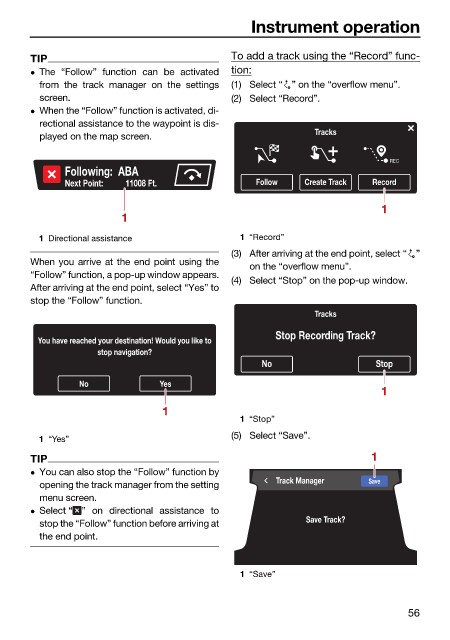
                        TIP                                   To add a track using the “Record” func-
                         The  “Follow” function can be  activated  tion:
                          from the  track manager  on the settings  (1) Select “ ” on the “overflow menu”.
                          screen.                             (2) Select “Record”.
                         When the “Follow” function is activated, di-
                          rectional assistance to the waypoint is dis-
                          played on the map screen.                          Tracks

                                                                                           REC
                               Following:  ABA
                               Next Point:           11008 Ft.    Follow   Create Track  Record

                                                                                          1
                                         1

                          1 Directional assistance             1 “Record”
                                                              (3) After arriving at the end point, select “ ”
                        When you arrive at the end point using the
                                                                 on the “overflow menu”.
                        “Follow” function, a pop-up window appears.
                                                              (4) Select “Stop” on the pop-up window.
                        After arriving at the end point, select “Yes” to
                        stop the “Follow” function.
                                                                             Tracks
                                                                      Stop Recording Track?
                          You have reached your destination! Would you like to
                                     stop navigation?
                                                                   No                    Stop

                                 No             Yes
                                                                                          1
                                                 1
                                                               1 “Stop”
                                                              (5) Select “Save”.
                          1 “Yes”
                        TIP                                                             1
                         You can also stop the “Follow” function by
                                                                      Track Manager    Save
                          opening the track manager from the setting
                          menu screen.
                         Select “ ” on directional assistance to
                                                                            Save Track?
                          stop the “Follow” function before arriving at
                          the end point.


                                                               1 “Save”


                                                                                               56
   60   61   62   63   64   65   66   67   68   69   70