


Page 70 - LIT-18626-14-58
P. 70
UF7K10E0.book Page 61 Thursday, July 13, 2023 5:40 PM
Instrument operation
(2) Enter the new PIN code to be set, and To select the display units:
select “ ”. Select “ ” or “ ”.
(3) Enter the new PIN code again, and EJU46783
Selecting the display language
select “ ”.
(“ ”)
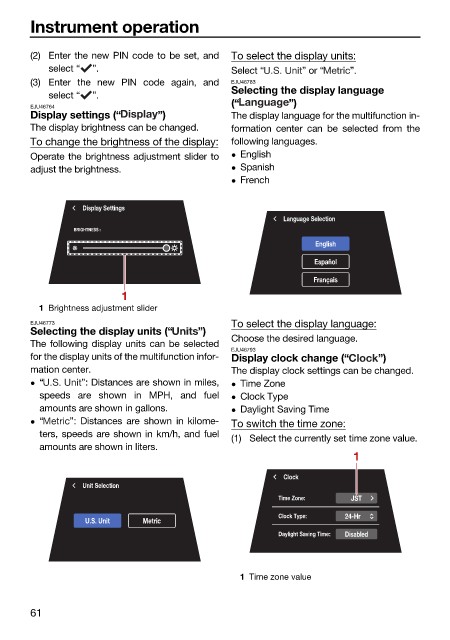
EJU46764
Display settings (“ ”) The display language for the multifunction in-
The display brightness can be changed. formation center can be selected from the
To change the brightness of the display: following languages.
Operate the brightness adjustment slider to English
adjust the brightness. Spanish
French
Display Settings
Language Selection
BRIGHTNESS :
English
Español
Français
1
1 Brightness adjustment slider
EJU46773 To select the display language:
Selecting the display units (“ ”)
The following display units can be selected Choose the desired language.
EJU46793
for the display units of the multifunction infor- Display clock change (“ ”)
mation center. The display clock settings can be changed.
“ ”: Distances are shown in miles, Time Zone
speeds are shown in MPH, and fuel Clock Type
amounts are shown in gallons. Daylight Saving Time
“ ”: Distances are shown in kilome- To switch the time zone:
ters, speeds are shown in km/h, and fuel
(1) Select the currently set time zone value.
amounts are shown in liters.
1
Clock
Unit Selection
Time Zone: JST
Clock Type: 24-Hr
U.S. Unit Metric
Daylight Saving Time: Disabled
1 Time zone value
61

