


Page 71 - LIT-18626-14-58
P. 71
UF7K10E0.book Page 62 Thursday, July 13, 2023 5:40 PM
Instrument operation
(2) Select the desired time zone.
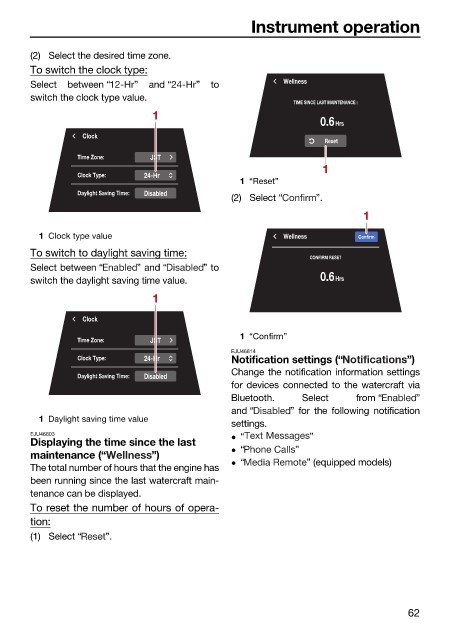
To switch the clock type:
Select between “ ” and “ ” to Wellness
switch the clock type value.
TIME SINCE LAST MAINTENANCE :
1
0.6Hrs
Clock
Reset
Time Zone: JST
1
Clock Type: 24-Hr
1 “Reset”
Daylight Saving Time: Disabled
(2) Select “ ”.
1
1 Clock type value Wellness Confirm
To switch to daylight saving time: CONFIRM RESET
Select between “ ” and “ ” to
switch the daylight saving time value. 0.6Hrs
1
Clock
Time Zone: JST 1 “Confirm”
EJU46814
Clock Type: 24-Hr Notification settings (“ ”)
Daylight Saving Time: Disabled Change the notification information settings
for devices connected to the watercraft via
Bluetooth. Select from “ ”
and “ ” for the following notification
1 Daylight saving time value
settings.
EJU46803 “ ”
Displaying the time since the last
“ ”
maintenance (“ ”)
“ ” (equipped models)
The total number of hours that the engine has
been running since the last watercraft main-
tenance can be displayed.
To reset the number of hours of opera-
tion:
(1) Select “ ”.
62

