Page 72 - LIT-18626-14-58
P. 72

UF7K10E0.book  Page 63  Thursday, July 13, 2023  5:40 PM


                        Instrument operation


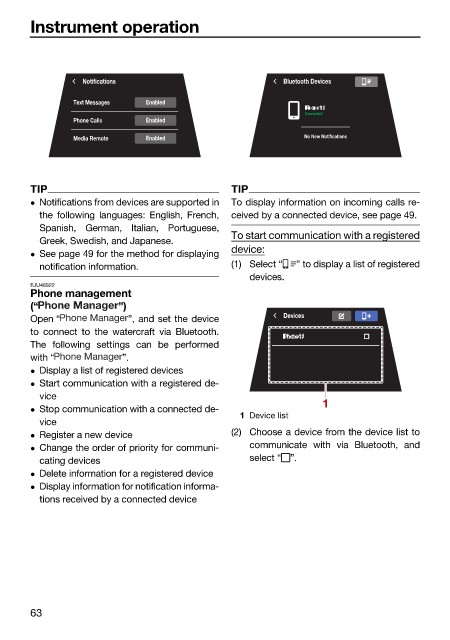
                                  Notifications                         Bluetooth Devices

                                Text Messages  Enabled
                                                                           Connected
                                Phone Calls   Enabled
                                Media Remote  Enabled                      No New Notifications


                        TIP                                   TIP
                         Notifications from devices are supported in  To display information on incoming calls re-
                          the following languages: English, French,  ceived by a connected device, see page 49.
                          Spanish, German, Italian, Portuguese,
                                                              To start communication with a registered
                          Greek, Swedish, and Japanese.
                                                              device:
                         See page 49 for the method for displaying
                          notification information.           (1) Select “  ” to display a list of registered
                                                                 devices.
                        EJU46822
                        Phone management
                        (“               ”)
                        Open “            ”, and set the device        Devices
                        to connect  to  the watercraft via  Bluetooth.
                        The following settings can  be performed
                        with “           ”.
                         Display a list of registered devices
                         Start communication with a registered de-
                          vice                                                 1
                         Stop communication with a connected de-
                                                               1 Device list
                          vice
                         Register a new device               (2) Choose a device from the device list to
                         Change the order of priority for communi-  communicate with via  Bluetooth, and
                          cating devices                         select “ ”.
                         Delete information for a registered device
                         Display information for notification informa-
                          tions received by a connected device


                        63
   67   68   69   70   71   72   73   74   75   76   77