


Page 75 - LIT-18626-14-58
P. 75
UF7K10E0.book Page 66 Thursday, July 13, 2023 5:40 PM
Instrument operation
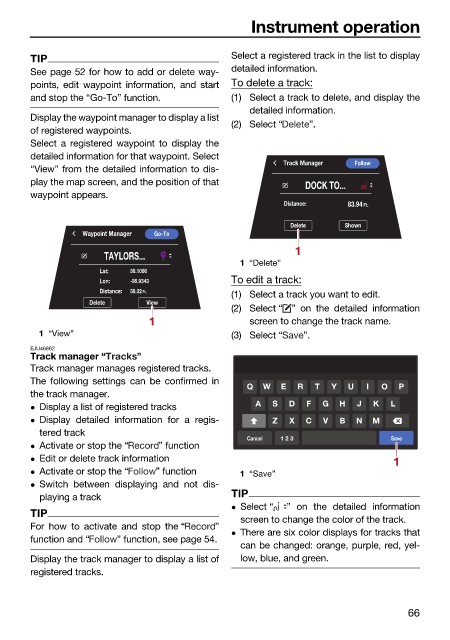
TIP Select a registered track in the list to display
See page 52 for how to add or delete way- detailed information.
points, edit waypoint information, and start To delete a track:
and stop the “Go-To” function. (1) Select a track to delete, and display the
detailed information.
Display the waypoint manager to display a list
(2) Select “ ”.
of registered waypoints.
Select a registered waypoint to display the
detailed information for that waypoint. Select
Track Manager Follow
“View” from the detailed information to dis-
play the map screen, and the position of that
DOCK TO...
waypoint appears.
Distance: 83.94 Ft.
Delete Shown
Waypoint Manager Go-To
1
TAYLORS...
1 “Delete”
Lat: 36.1086
Lon: -95.9343 To edit a track:
Distance: 38.32 Ft.
(1) Select a track you want to edit.
Delete View
(2) Select “ ” on the detailed information
1 screen to change the track name.
1 “View” (3) Select “ ”.
EJU46862
Track manager “ ”
Track manager manages registered tracks.
The following settings can be confirmed in
Q W E R T Y U I O P
the track manager.
A S D F G H J K L
Display a list of registered tracks
Display detailed information for a regis- Z X C V B N M
tered track
Cancel 1 2 3 Save
Activate or stop the “ ” function
Edit or delete track information 1
Activate or stop the “ ” function 1 “Save”
Switch between displaying and not dis-
playing a track TIP
Select “ ” on the detailed information
TIP
screen to change the color of the track.
For how to activate and stop the “ ”
There are six color displays for tracks that
function and “ ” function, see page 54.
can be changed: orange, purple, red, yel-
Display the track manager to display a list of low, blue, and green.
registered tracks.
66

