Page 75 - LIT-18626-15-20
P. 75

UF3X16E0.book  Page 63  Wednesday, July 17, 2024  9:11 AM


                                                                 Instrument operation

                        To select the display units:          (2) Select the desired time zone.
                        Select “     ” or “   ”.              To switch the clock type:
                        EJU46783                              Select between “   ” and “     ” to
                        Selecting the display language
                                                              switch the clock type value.
                        (“         ”)
                        The display language for the multifunction in-              1
                        formation  center can be selected  from the
                                                                       Clock
                        following languages.
                         English                                     Time Zone:    JST
                         Spanish
                                                                      Clock Type:  24-Hr
                         French
                                                                      Daylight Saving Time:  Disabled

                                  Language Selection
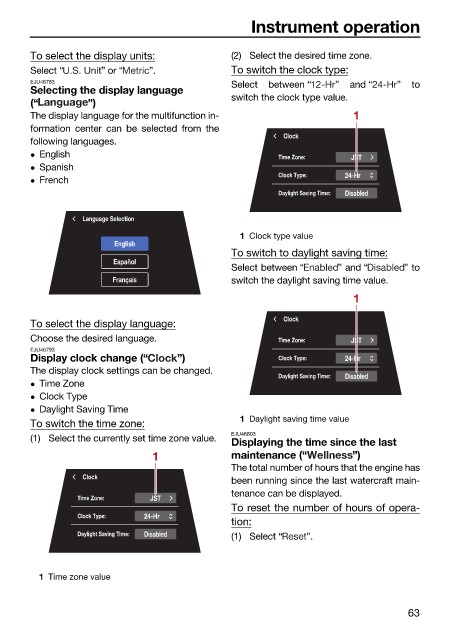
                                                               1 Clock type value
                                        English
                                                              To switch to daylight saving time:
                                        Español
                                                              Select between “   ” and “      ” to
                                        Français              switch the daylight saving time value.
                                                                                    1

                                                                       Clock
                        To select the display language:
                        Choose the desired language.                  Time Zone:    JST
                        EJU46793
                        Display clock change (“     ”)                Clock Type:  24-Hr
                        The display clock settings can be changed.
                                                                      Daylight Saving Time:  Disabled
                         Time Zone
                         Clock Type
                         Daylight Saving Time
                        To switch the time zone:               1 Daylight saving time value
                        (1) Select the currently set time zone value.  EJU46803
                                                              Displaying the time since the last
                                               1              maintenance (“        ”)
                                                              The total number of hours that the engine has
                                  Clock
                                                              been running since the last watercraft main-
                                                              tenance can be displayed.
                                 Time Zone:    JST
                                                              To reset the number of hours of opera-
                                 Clock Type:  24-Hr
                                                              tion:
                                 Daylight Saving Time:  Disabled  (1) Select “  ”.


                          1 Time zone value


                                                                                               63
   70   71   72   73   74   75   76   77   78   79   80