


Page 52 - LIT-18626-15-27
P. 52
UF5S10E0.book  Page 42  Monday, September 23, 2024  2:13 PM


                        Watercraft operation

                        EJU47891                              To operate the watercraft using the drive
                        Drive control mode
                                                              control mode:
                        The drive control mode is a function for set-
                        ting the maximum watercraft speed.    (1) Release the throttle lever and let the en-
                        The maximum watercraft speed can be se-  gine speed return to idle.
                        lected from two settings.             (2) Turn the drive control mode on.
                        Activating the drive control mode     (3) Squeeze the throttle lever.
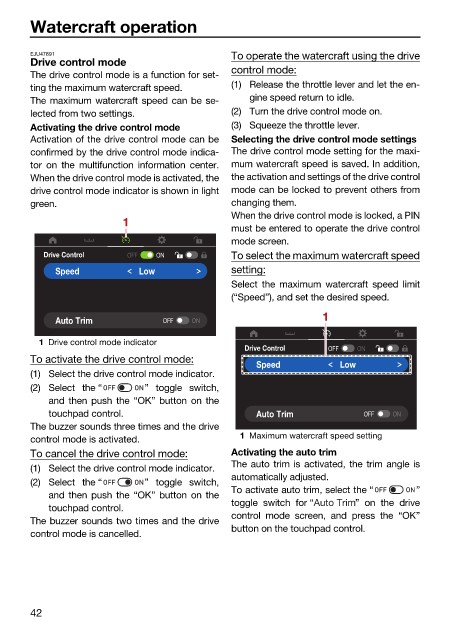
                        Activation of the drive control mode can be  Selecting the drive control mode settings
                        confirmed by the drive control mode indica-  The drive control mode setting for the maxi-
                        tor on  the multifunction information center.  mum watercraft speed is saved. In addition,
                        When the drive control mode is activated, the  the activation and settings of the drive control
                        drive control mode indicator is shown in light  mode can be locked to prevent others from
                        green.                                changing them.
                                         1                    When the drive control mode is locked, a PIN
                                                              must be entered to operate the drive control
                                                              mode screen.
                           Drive Control  OFF   ON            To select the maximum watercraft speed
                             Speed          Low               setting:
                                                              Select the maximum watercraft  speed limit
                                                              (“Speed”), and set the desired speed.
                             Auto Trim           OFF  ON                       1

                          1 Drive control mode indicator
                                                                Drive Control   OFF  ON
                        To activate the drive control mode:       Speed           Low
                        (1) Select the drive control mode indicator.
                        (2) Select the “      ” toggle switch,
                            and then push the “OK” button on the
                            touchpad control.                     Auto Trim           OFF   ON
                        The buzzer sounds three times and the drive
                        control mode is activated.             1 Maximum watercraft speed setting
                        To cancel the drive control mode:     Activating the auto trim
                        (1) Select the drive control mode indicator.  The auto trim is activated, the trim angle is
                                                              automatically adjusted.
                        (2) Select the “      ” toggle switch,
                                                              To activate auto trim, select the “  ”
                            and then push the “OK” button on the
                                                              toggle switch  for “   ” on the drive
                            touchpad control.
                                                              control mode screen, and press the “OK”
                        The buzzer sounds two times and the drive
                                                              button on the touchpad control.
                        control mode is cancelled.


                        42

